















Feature Wiki
Tabs
Redesign Simple Search and Advanced Search
1 Description
- Actually in the simple-search page, a user see the word "Search" 9 times.
- The form uses a lot of space
- and other areas can be improved (see picture "Search engine now")
- reduce clutter
- The first tab search in all objects
- Tabs are used for "Search by type" (is Google and Xing-Concept). If you type a term in the first tab, save, and then you change to another tab, ILIAS will present the type-search results immediately
- A new search-type "persons" will be introduced. With this, user only search for other users. (We must implement the possibility to set this search-type On/Off in the platform-administration)
- New: There is a button (not tab) to reach the "Advanced search". The advanced-search opens in a overlay (=> similar user-interaction as the "Add-comment"-overlay). After the search in the advanced-search, ILIAS closes the overlay and presents the simple-search.
Search engine now | Search optimized - Search in object types with tabs | Advanced Search - Overlay (similar to comments and notes) |
  |  | 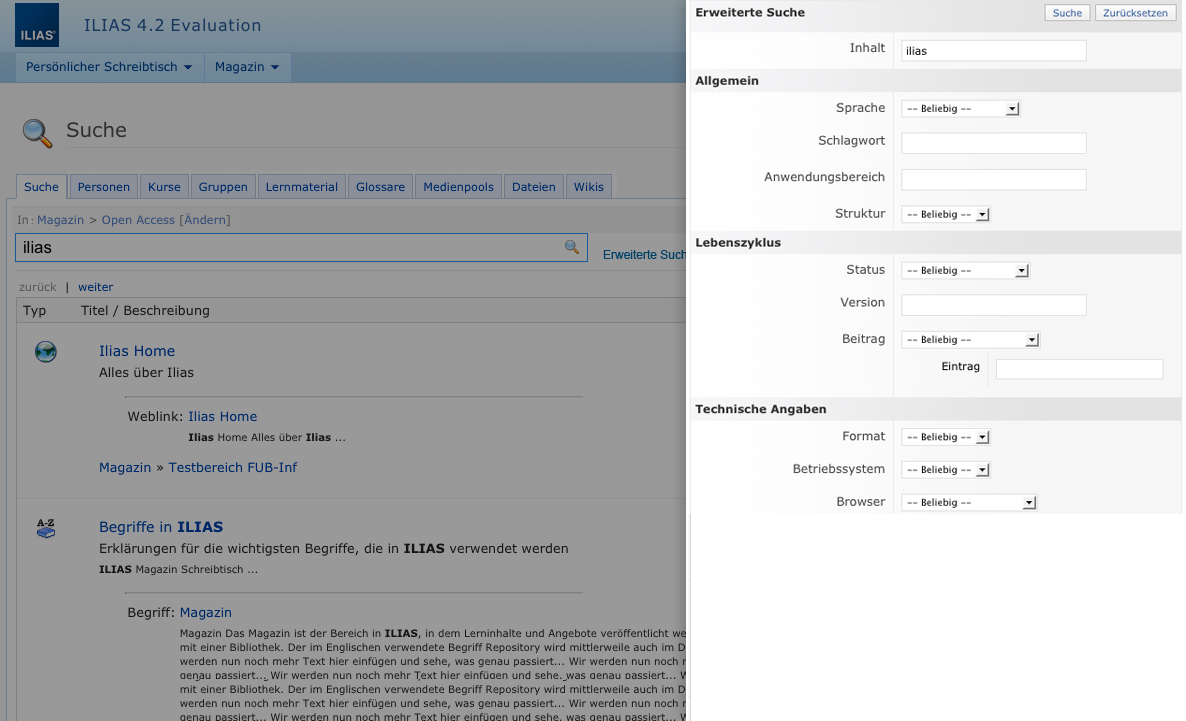 |
see also: Search for Personal Profiles
- The standard behaviour of Google search is the "AND" mode. ILIAS system administrators should have the possibility to set the default mode ("AND" or "OR") for all search types (in tab "Settings"). Actually you can only set this in the Lucene-settings.
- We suggest that users can choose the boolean query only in the advanced search. Same user interaction like http://www.google.ch/advanced_search.
- Redesign Administration Search
- tabs: Settings (Max hits, Search Type, Hide Advanced Search, Number of Auto Complete List entries, Default Operator, Search by type) // Advanced Search // Lucene (Number of Text Fragments, Size of Text Fragments, Number of Subitems, Relevance of Search Results, Last Index Generation) // Permissions
2 Status
- Scheduled for: ILIAS 4.3
- Funding: Universität Bern
- Development: Feature is to be developed by Leifos
3 Additional Information
- If you want to know more about this feature, its implementation or funding, please contact: Hansjörg Lauener, Universität Bern / info@ilub.unibe.ch
4 Discussion
Pascal, 22.02.2012: I like the idea of make the search even more easy and slimmer. The only thing I don't know if it works well are the tabs per object type. If a user looks for a group or course he or she usualy doesn't know if it is one or the other type.
Yvonne, 22.02.2012: The default tab "Suche/Search" would be as usual and search in the whole ILIAS. At the moment there is the possibility to search in object types with selecting the radiobutton "Detailed search. Please select one or more resource types.". So if users don't know if they have to search in courses or groups they have still the possibility to search over the whole ILIAS. Or would you like to combine courses and groups together in one tab?
- No tabs for the types, since users may want e.g. to search in learning moduels, wikis and glossaries in one search. Additionally this solution is not scalable, when more object types (e.g. blogs or plugins) implement a search feature.
- Simple Presentation: We agree that a "toolbar" like look would suit better. It could be simply: "_________ [Search Button] [Options v]" (downward arrow at the end). The options could offer the settings for area and types. If we make use of Javascript we can avoid any additional page requests.
- Advanced Search: We currently prefer to have the separate tab like now.
- to rename "Globally" to "In the repository" and keep "At Current Position".
- to remove the "AND / OR" option completely, also when the LIKE search is used.
- to remove the Combination/Area/Type information and to display "Search only in: ..." if the position is set. (behind the options drop down)
HJ 2 Oct 2012 - Discussion posting
> to remove the "AND / OR" option completely, also when the LIKE search is used.
We agree, the option "And / Or" can be removed. If a user types different words in the field search term, then ILIAS should show all AND-combinations first, and all OR-combinations after the AND-combinations.
>to remove the Combination/Area/Type information and to display "Search only in: ..." if the position is set. (behind the options drop down)
Can you make a mockup for the direct search and the Lucene-search?
10 Oct 2012 - Mockup by Pascal Schmitt, PHZ:

Mockup by iLUB, Unibe, 30. Okt. 2012

JF 26 Nov 2012: We will improve the usability during stable.
5 Follow-Up
Last edited: 17. Apr 2025, 15:07, Kunkel, Matthias [mkunkel]