









Feature Wiki
Tabs
Introducing Online Help
Page Overview
[Hide]1 Description
1.1 Version 1.0 for ILIAS 4.3
- The group has submitted a report of it's plans and findings to the ILIAS Community via this page and the Jour Fixe.
- After the project's approval and a round of fundraising the work on the Online help has started: a dozen editors have been trained and started wirting.
- The progress can be assessed at the official ILIAS evaluation installation.
- First Level Tool Tips ILIAS 4.3: The On-Screen Help explains elements of the Graphical User Interface (GUI).
- Second Level Sequence Help / Workflow Help: The Sequence Help / Workflow Help offers the users guidance on a sequence of steps needed to carry out an action like setting up a group.
The ILIAS Society publishes an "Online Help Package" on the ILIAS Website. The "Online Help Package" contains all online help texts of the first two levels provided by the Community. It will be available free of charge.
The "Online Help Package" is released with (or shortly after) the ILIAS 4.3 stable. The "Online Help Package" can to be imported and installed with ILIAS 4.3.
The ILIAS Administration panel was extended to allow importing these „Online Help Packages“. Administrators can download and import the "Online Help Package". In the Administration panel the two levels can be switched on or off separately.
Users of the Online Help can Report Bugs in the text of the Online help using the Community bugtracker Mantis (http://www.ilias.de/mantis).
1.2 Outdated Concept from 2009
- Screen Help: explanation on the buttons and options
- Workflow Help: explanation on carrying out tasks comprising of several steps
- Didactical Help: explanation on a didactical scenario
First Level: Screen Help
The Screen Help explains elements of the Graphical User Interface (GUI). Users will be presented with a help icon next to a feature on the right hand side of the screen. When user clicks the help icon a short, text-only description will pop-up. In the pop-up a link will lead users to the next level being the Workflow Help. At the bottom of the pop-up a feed-back option will be offered.
Second Level: Workflow Help
The Workflow Help is identical with todays help learning module which is based on the ILIAS Manuals produced by Qualitus GmbH. Today these objects look like this.
The Sequence Help offers the user guidance on a sequence of steps needed to carry out an action like setting up a group.
The production process will remain the same: the Technical Writer will prepare the Manual in MS Word transforms it to Open Office and creates an ILIAS learning module using Elaix.
Third Level: Didactical Help
The didactical help offers a user advice on good practice in online learning. These scenarios depend highly on institutional purpose and culture. These documents could have any format and will be made available in the second level by linking.
The help project will *not* produce didactical help but offer a technical conept to provide this kind of help to users.
1.1. Generate Help ID
The help-production-installation has a special feature: in the footer of every page there is a button „Generate Help ID“. When you click it you get a uniquie ID.
Workflow
- The technical writer decides that some help is needed at a certain point in the system.
- The technical writer generates an ID on the very page the help is supposed to be placed on by hitting the "Generate Help ID" button.
- Additionally the technical writer takes a screen shot of that page.
- The technical writer creates a wiki page having the ID as a title.
- On the ID-titled page she writes the according help text.
- The technical writer goes to Mantis (http://www.ilias.de/mantis) and writes a report in the categroy „Help“. She provides the ID and the screenshot.
- The developer works off the Mantis report by placing the helpicon as indicated and putting the ID.
A special ILIAS- Installation will be used for producing the Screen Help. This installation will have special features which are described in more detail below: for each language there will be a separate Screen Help. Each Screen Help will be produced using a wiki. So there will be an English-Screen-Help-Wiki, a German-Screen-Help-Wiki and so forth.
- The Screen Help for a feature is permission-sensitive and thus will be presented only if a user has the according permission to use that feature.
- The Screen Help is *not* supposed to comprise picture because then it will not be able to be used in all the different skins people have.
All levels of the help are indexed seperatly. The index is a list of terms that are linked to the full Screen Help texts. All index terms have to „know“ to which Screen Help texts they belong. This is handled using the IDs of the page title.
- The Screen Help index consists of keyword listed at the bottom of each page. These keywords use a special characteristic in the wiki. The terms are added manually but harvested to the index automatically.
- The Index should support synonyms. Synonyms of the Screen Help are defined by applying a special characteristik to them in the wiki. This is done manually.

Clicking on the Screen Help Index would take the user to the respective index, which could look like:

The Table of Content of the Sequence Help might look like this:

The help has to be searchable. There will be a dedicated help-search separated from the normal search. It is placed in the main menu. When users click on the helpbutton they are taken to a search form that might look like the mock-up below.
The search results are listed below the search form. The results consist of a headline and some help text snipplet. The search term is highlighted. Users can click on the snipplet and is taken to the complete help text.

1.4 Importing and Exporting the Help from and to an Installation
With every Release higher than 4.1 there will be importable help files offered along with the normal release file. The help file will be generated from the wikis and learning modules in the help-production-installation.
Choosing language and level of help: the administrator will install the help files together with the release. The help files can be downloaded from the same place. The Administrator can choose whether she wants Screen Help and Workflow Help or just one type. As well she can choose the language. It should be possible to have the Screen Help in French and the Sequence Help in English.
Technical writers get feedback on their work by a special function. Users may use the function to provide feedback on the „helpfulness“ of the help. This feedback is used by the technical writers to improve the help for the next release.
At an ILIAS installation somewhere users use the feedback function. The data is prepared in line with privacy laws and send to the help-production-installation. Here the data is evaluated and used to improve the quality of the help.
As illustrated below each Screen Help Text has a button that allows users to assess the helpfulness of the help. Users can choose yes or no and may also add a comment. Even though we run the risk of being insulted every now and then this feedback function shoul help us to improve the help.
After sending feedback users should receive a message like „Thank you for helping us to improve the help function.“
The feedbacks are gathered and sent back to the wiki in the help-production-installation. The mechnism of this is not specified until now.
It mus not be mandatory to send back the feed-back. Institutions can do without quality assurance. If an institution does not want to send the feedback to the mother, then the little feedback question should not be displayed at all. The administrator can just switch it off.
In the wiki in the help-production-installation the data will be displayed similiar to the „popular pages“ function. All helptextpages are ranked from best to worst. All the yes and no votes are counted and serve as a basis for the ranking.
A „View Comments“ button provides access to the comments made by the users in the field. The technical writer use the Comment-function to work off the feedback. This can be done in a similar fashion as in the SCORM editor.

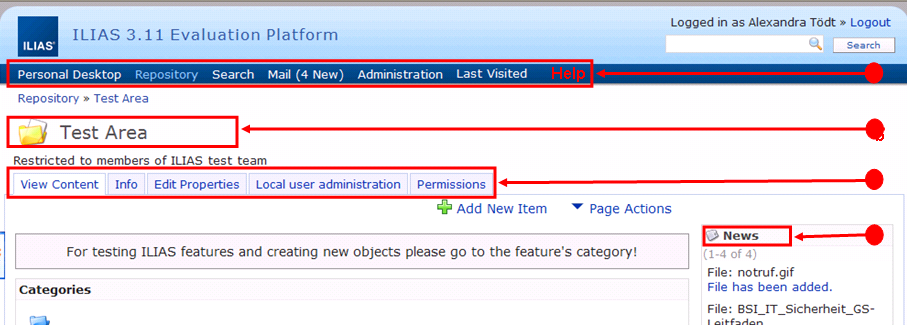
The screen help texts from the wikis should be assignable on different levels by the developer.
- Main Menu (on the right)
- Heading Level (on the right): Explains current object type
- Tab Level (on the right)
- Subtab Level (on the right)
- "Add New Item" dropdown (re-uses type explanations of Heading Level)
- Blocks (e.g. bottom left or top right corner)
- Forms (on the right)
- Help Search and Index are a new entry in the main menu
For 1. -3. and 6. see below.
When a user clicks on the help icon a little window pops up, it contains the Screen Help. See a mock-up of the pop-up below. Please The link at "More Information" will transfer users to the Workflow Help which is the corresponding page or chapter in the ILIAS Learning Module.

Note: There are two types of Screen Help. One type is generated using the wiki and the other one is transformed from the forms.
The very text that is used within the forms will be used as help text. The text is now a language variable within the formclass. This allows transforming the text into the help using a skript.
A link will be inserted to point to the right chapter of the Workflow Help.
- how will help texts be exported from the wiki?
- how can the language variables in the formclass be edited? How do technical writers know if it is a wiki or a form entry?
- how will Screen Help and Sequence Help be linked?
- how are the language wikis linked? German is the mother language from which all others are translated. How are changes notified and managed?
2 Status
- Scheduled for: ILIAS 4.3
- Funding: Currently Partly Funded by PHTG, Universität Bonn, Leifos, COGNOS AG, Universität zu Köln
- Development: Feature is to be developed by Leifos
3 Additional Information
- If you want to know more about this feature, its implementation or funding, please contact: toedt(at)leifos.com
4 Discussion
Pascal Schmitt, August 5th
Suggested rule for placing the help icon: The help icon will aligned right hand side of the feature it explains.
I think this makes the screen getting full of help-icons and this is, in my opinion, not the way it should be.
I like the way the help-function is implemented in "Windows". You have one Help-Icon and if you click it your cursor switch to an questionmark. Now you can click on an element and the helptext assignet to this element occours (in Windows they only show a kind of tooltip with little informations. This can be done better of course).
Matthias Kunkel, 11 Sep '09: I would like to recommend HTML dummies for the most important ILIAS pages before we start implementation. These dummies should be evaluated as soon as possible in cooperation with the Berne usability lab.
Matthias Kunkel, Alexander Killing, 15 Feb 2012: We highly appreciate the efforts of the SIG online help and the concept for a first version of the online help. We schedule this feature for ILIAS 4.3 and looking forward for additional funding to implement this important feature.
JF 22 Feb 2012: We had a look at a first prototype of the 2nd level help. The current version works with help screen IDs that are assigned within a learning module. Alex will check a more automatic way. The idea is that screen IDs are defined by the tab/subtab/obj_type combination and can be additionally set by code. These IDs should be displayed in an online help installation and be assigned to help pages by the online help authors (multiple screen IDs per help chapter).
5 Implementation
- In a special installation an Online Help Package can be prepared. An Online Help Package contains
- tooltips providing short explainations of GUI-elements when users hover with their mouse over the respective element.
- workflow instructions outlining how to use ILIAS objects.
- The package can be exported from the special installation comprising all help texts.
- The package can be locally imported. There is a new Section "Online Help in the Administration".
- In one's administration one can switch on and off the tooltips and the workflow help separately.
- Tooltips for the main menu, add-new-object-dialogue, the tabs of the objects and the links underneath the tabs.
- Workflow help for the following repsoitory objects: course, file, excercise, forum, wiki (without page editor), glossary, group, mediacast, weblink, surveypool, chat, session, blog, category, customize page fka text-/mediaeditor
- Workflow help for the following parts of the personal desktop: my workspace, blog, contacts, bookmarks, settings, overview, my courses and groups, notes and comments, mail
- Workflow help for the following crossectional functionality: search, add-new-object-dialogue, calendar in courses and groups.
Please report errors in the help with the community bugtracker.
If you want to start a translation project / getting the infrastructure in place for multilinguality please contact toedt (at) leifos.com
Last edited: 17. Apr 2025, 15:04, Kunkel, Matthias [mkunkel]