









Feature Wiki
Tabs
Highlight Link Areas
1 Description
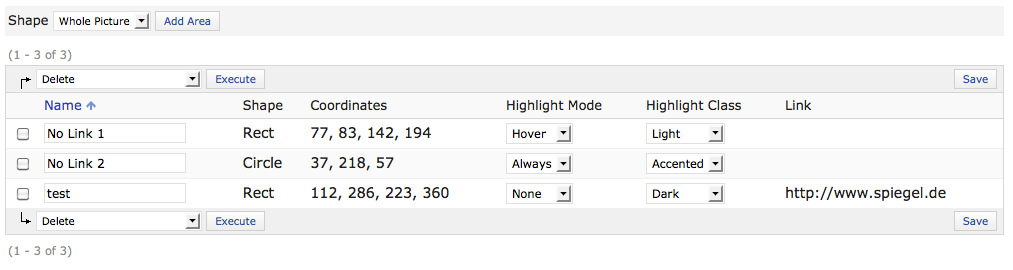
Currently (ILIAS 4.2) when a media object uses link areas, the shapes of the areas are drawn in the edit mode but are not highlighted for the user in presentation view. A new option should be added to media objects that defines how the areas are presented for the user: Not highligthed (like now), Highlighted On-Mouse-Over, Always Highlighted. It should also be possible to have at least two different color options for the highlighting to ensure that it works for all kind of images. Furthermore it should be possible to highlight areas without linking them.
2 Status
- Scheduled for Release: ILIAS 4.3
- Funding: Open Consulting
- Development: Feature is to be developed by Leifos
3 Additional Information
- If you want to know more about this feature, its implementation or funding, please contact: alex.killing (at) gmx.de
4 Discussion
JF 22 Feb 2012: We appreciate this idea and schedule it for 4.3.
5 Implementation
The settings are implemented as described above and can be found in the "Default Link Areas" and in the "Instance Link Areas" tab of media objects. Please note that this implementation has changed due to customer feedback on 28 Sep 2012: It is not possible to set the mode and the class for each area individually.
Last edited: 17. Apr 2025, 15:06, Kunkel, Matthias [mkunkel]