





























Feature Wiki
Tabs
Additional (Bulk) Actions for the Learning Module Table
Page Overview
[Hide]- 1 Summary
- 2 Problem Statement
- 3 Concept
- 4 User Interface Modifications
- 5 Non-Functional Implications
- 5.1 Security
- 5.2 Privacy
- 5.3 Accessibility Implications
- 6 Process Information
- 6.1 Involved Authorities
- 6.2 Contact
- 6.3 Funding
- 7 Discussion
- 8 Implementation
- 8.1 Description and Screenshots
- 8.2 Test Cases
- 8.3 Privacy
- 8.4 Approval
1 Summary
The Learning Module table should support (bulk) actions for adding multiple pages or chapters and changing the titles of multiple selected items. These actions would reduce repetitive work when building or reorganising learning modules.
2 Problem Statement
Users currently need to add pages or chapters one at a time. This can be time-consuming when creating several pages in a row or adding multiple subchapters to an existing chapter. Users also have to change titles individually, even when they want to update several selected pages or chapters.
3 Concept
Add (bulk) actions to the Learning Module table that allow users to:
- Insert multiple pages or chapters before or after a selected item
- Change the titles of multiple selected pages or chapters in one step
The insertion workflow could follow the existing New Columns before/after interaction for Data Tables in the Page Editor, which lets users specify the number of items to add in a modal. To preserve the option to title items during insertion, the existing Insert Chapter before/after actions could remain, with separate Insert multiple Chapters before/after actions.
The title-editing workflow could follow the multi-file upload modal, where users can edit titles and descriptions (not needed here) for several files together.
4 User Interface Modifications
4.1 List of Affected Views
- Learning Module table
- Action menu for inserting pages and chapters
- Bulk Action menu for selected pages and chapters
4.2 User Interface Details
- Add actions to insert multiple pages or chapters before or after the selected item
- Let users specify how many items to insert in a modal
- Let users specify how many items to insert in a modal
- Keep the existing single-item insertion actions available
- Add a Change multiple Titles Bulk Action for selected pages or chapters
- In the title-editing modal, provide a field for each selected item so users can update all titles in one place
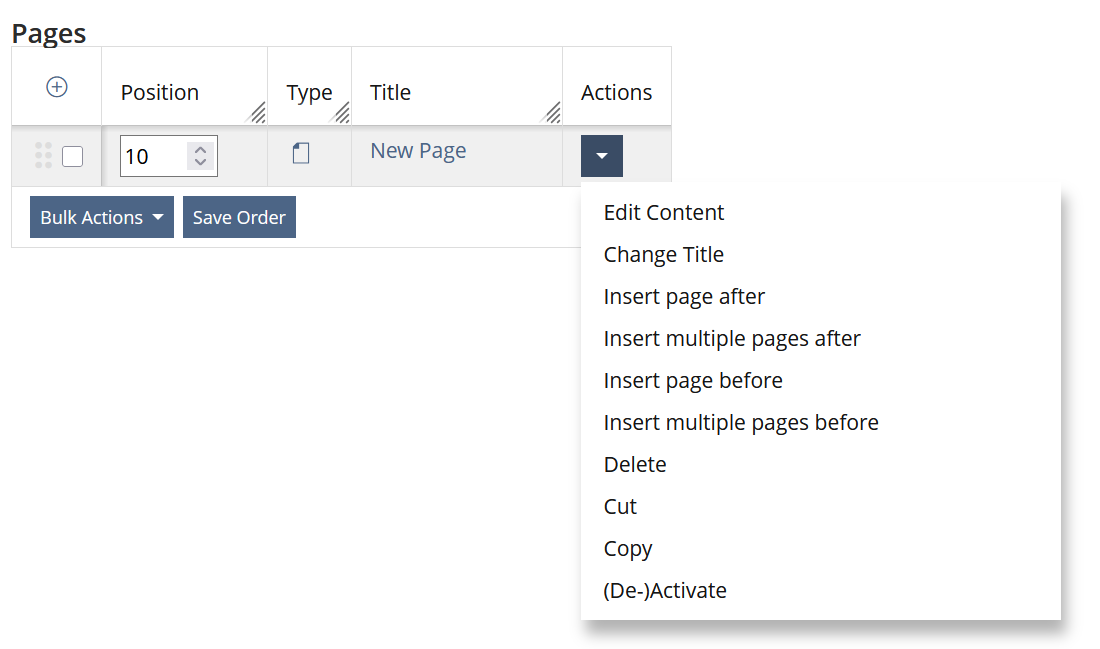
 Actions including Insert multiple pages after/before
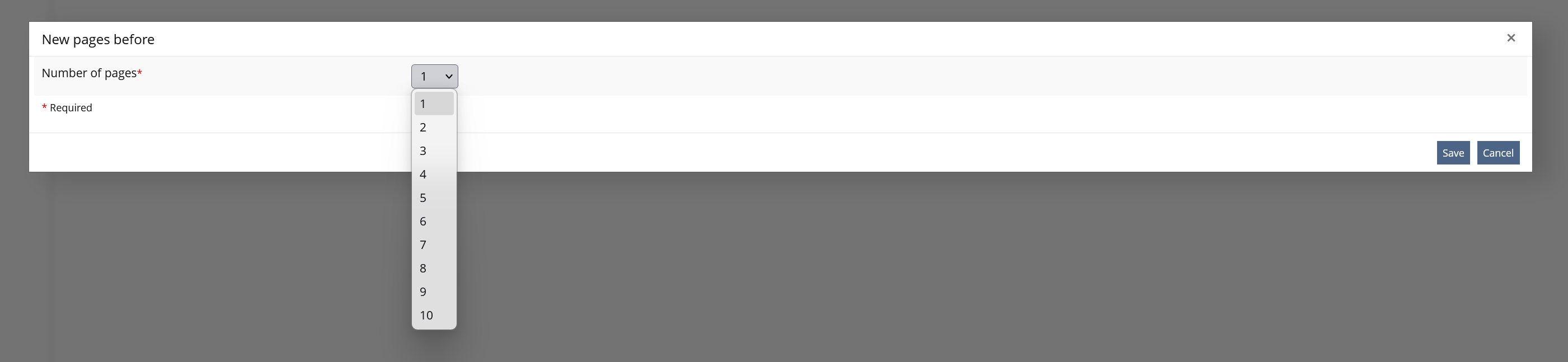 Modal with selection of number of new pages
 Bulk Actions including Change multiple titles
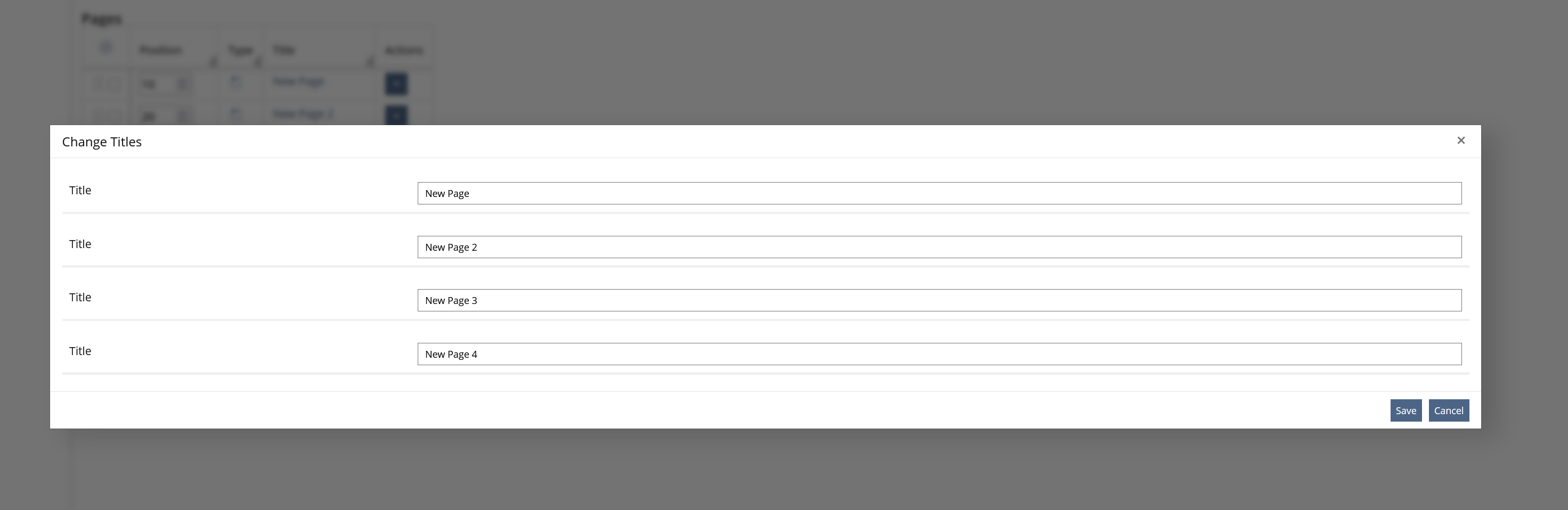
The mockups show only the action menus and selection options for pages. The same behaviour should apply to chapters exactly as shown.
4.3 New User Interface Concepts
This proposal introduces modal workflows for inserting multiple items and editing multiple titles. They should follow established ILIAS patterns.
4.4 Technical Aspects
The (bulk) actions should apply to the selected pages or chapters and preserve their intended order in the Learning Module table. The title-editing action should update only the selected items and provide clear feedback when the changes have been saved.
5 Non-Functional Implications
5.1 Security
None
5.2 Privacy
None
5.3 Accessibility Implications
Ensure that (bulk) action controls and modal dialogs are keyboard-accessible, have clear accessible names, and announce validation errors and save confirmations to screen-reader users. In the title-editing modal, associate each input with the relevant page or chapter title.
6 Process Information
6.1 Involved Authorities
- Authority to Sign off on Conceptual Changes: Killing, Alexander [alex]
- Authority to Sign off Code Changes: Killing, Alexander [alex]
If this request is related to multiple components, please list both authorities for all related components.
6.2 Contact
Person to be contacted in case of questions about the feature or for funding offers: Becker, Matthias [matthias.becker]
6.3 Funding
Funding status and funding parties are listed in the block 'Status of Feature' in the right column of this page.
If you are interested to give funding for this feature, please get into contact with the person mentioned above as 'Contact'.
7 Discussion
8 Implementation
Feature has been implemented by {Please add related profile link of this person}
8.1 Description and Screenshots
{ Description of the final implementation and the changed behaviour in the related components. Please add screenshots to visualise the changes if possible. }
8.2 Test Cases
Test cases completed at {date} by {user}
- {Test case number linked to Testrail} : {test case title}
8.3 Privacy
Information in privacy.md of component: updated at {date} by {user} | no change required
8.4 Approval
Approved at {date} by {user}.
Last edited: 12. Oct 2026, 16:40, Becker, Matthias [matthias.becker]