





Feature Wiki
Tabs
Revise Ordering Questions (Horizontal and Vertical) Creation Process
Page Overview
[Hide]- 1 Initial Problem
- 2 Conceptual Summary
- 3 User Interface Modifications
- 4 Additional Information
- 4.1 Involved Authorities
- 4.2 Technical Aspects
- 4.3 Privacy
- 4.4 Security
- 4.5 Contact
- 4.6 Funding
- 5 Discussion
- 6 Implementation
- 6.1 Description and Screenshots
- 6.2 Test Cases
- 6.3 Privacy
- 6.4 Approval
1 Initial Problem
The set of questions available has grown organically over many years. There are redundancies and inconsistencies and the forms to edit the questions are based on a lot of custom code based on the legacy forms featuring many unique concepts, like forms that are rendered by javascript on the client.
There is a clear need to bring this process back in alignment with the current way of doing things in ILIAS, to remove redundancies, and rectify inconsistencies.
Having too many question types that do not offer solutions to clearly distinguishable problems is confusing and makes using ILIAS harder to learn. For the question types "Ordering Question (Horizontal)" and "Ordering Question (Vertical)" the similarity is already visible in their names, but the current implementations are very different one from the other: The horizontal version offers far fewer options than the vertical version. This feature request proposes to streamline the behavior and unify the two types into one.
2 Conceptual Summary
- This Feature Request follows the guidelines set by Revision of ILIAS Test Question Creation Process and fleshed out for the answer form type "Cloze" in Revise Cloze, Long Menu, Numeric, and Text Subset Question Creation Process.
- This request is only concerned with question creation and structure. The form to answer a question will basically stay as is and only undergo some minor tweaks.
- The form to set up the answer form will first offer, if the context the form is used in requires Marking, a required numeric input to enter the points, then a required select input to select the display direction labeled "View" with the options "Horizontal" and "Vertical", where "Horizontal" will be the default, a checkbox labeled "Enable Nesting" with the byline "Elements can be nested inside each other creating hierarchies of elements", a required numeric input to set the image size that is prefilled with '150', and a numeric input to specify the number of elements that should be created during the creation process.
- The second step of the form will show the number of section defined in the previous step offering each an input to add a text for the element allowing for markdown and an input to add one single image. At least one of the two inputs needs to contain information for the form submission to be valid.
- The third step will only be shown, if the current context requires Marking and will provide an ordering input to put the elements in the right structure.
- The overview for question editing will first show a panel containing the basic answer form properties displaying the selected view, nesting, the available points (if the current context requires Marking), and a button to edit the basic properties. If the context the question is used in requires Marking, below the panel a view control will allow to switch between a view to edit elements and another view to order elements. If the context does not require Marking, only the view to edit the elements is available, as there is no need to define the correct order of elements in this case. Both views will offer a button to add new elements. New elements will simply be appended to the list of existing elements. The view to edit elements, will present a data table listing all elements showing two columns "Text" and "Image". It will offer two standard actions to edit one or multiple elements and to delete one or multiple elements. If an element is deleted that is defined as a parent to other elements, these elements will move one level up filling the position of their previous parent. The view to order elements will contain an ordering input, that will be displayed according to the selected view.
- The feedback options are kept exactly as today and only offer options to provide feedback texts for the case the participant has given the best possible response or not.
3 User Interface Modifications
3.1 List of Affected Views
- All views of `assOrderingHorizontalGUI` and `assOrderingQuestionGUI`
3.2 User Interface Details

 The first step of the form to create an answer form shows five inputs: The first one to enter the available points will only be shown if the current context requires Marking, the second "View" defines the direction in which the ordering will be displayed, the third enables nesting, the forth defines the size of images, if they are used, and the last one defines how many elements should be created during the initial creation process.
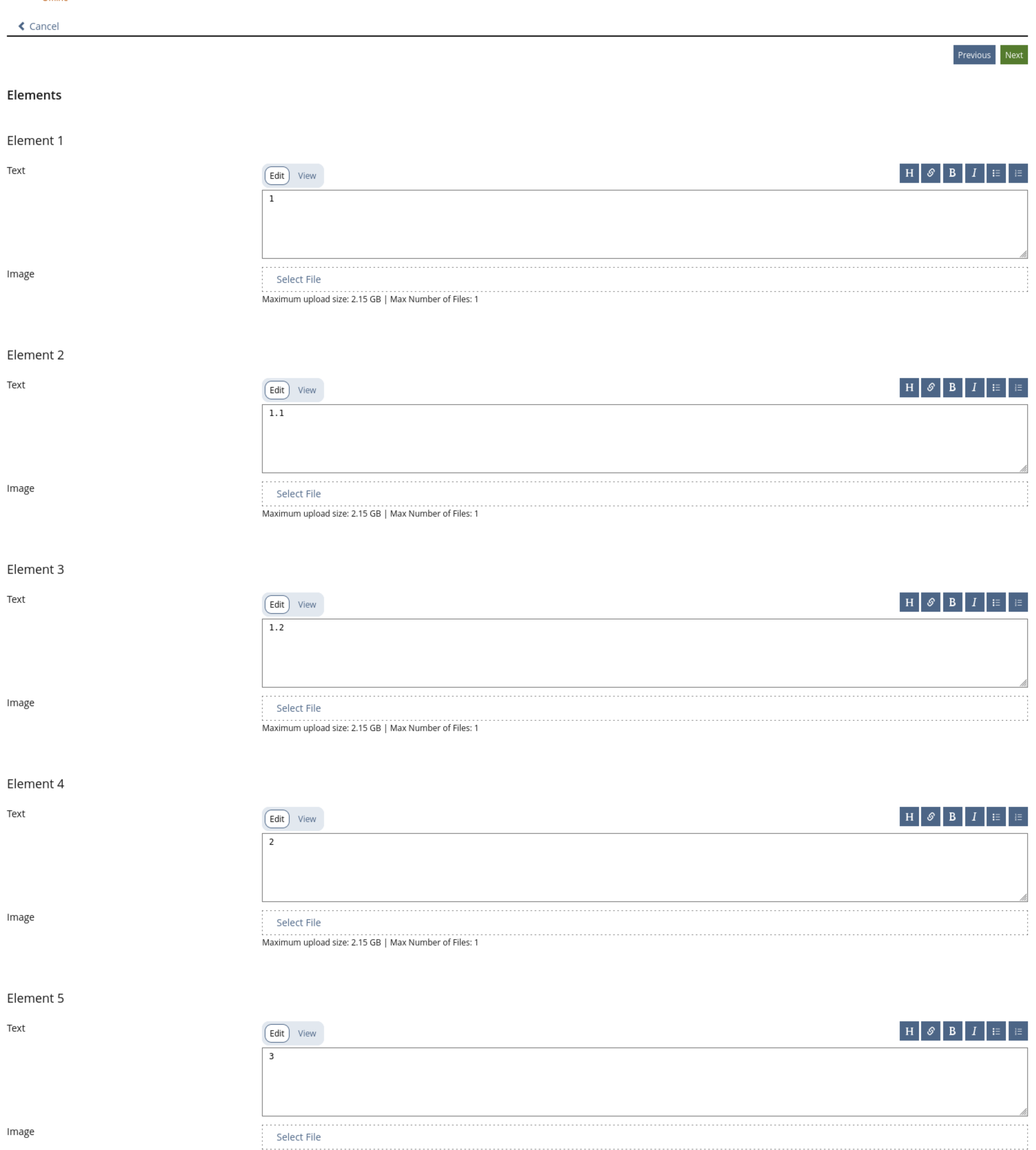 The second form step show a section per element that should be added. Each section contains a markdown input to add a text and another input to add an image. Exactly one image can be added. At least one of the two inputs must be provided otherwise the form is invalid.
 The final step show a still to be defined ordering input element. It is suggested to reuse the current one used in in the ordering element, but to adapt it, so that it can be displayed vertically or horizontally. The horizontal version would show the elements on the top level from left to right and nested element would be displayed inside the corresponding element underneath the text/image of the level above. See below for a simple mockup.
 The initial overview page for the answer form shows a panel displaying the basic answer form properties that contains information on the points, if the current context requires Marking, the selected view, on the status of nesting and the image size. Below that a view control allows to switch between editing the elements (default) and editing the order, if the current context requires Marking. If not only the view to edit elements is available, as there is no need to define a correct order. A button to add an element will open a prompt with two inputs, one for the text and one for the image of which at least one needs to contain some information to make the form valid. Below that a table with two columns, one labeled "Text" the second one labeled "Image" lists all the existing elements in a linear order following the actual ordering, but without the nesting. The Table has standard actions to delete one or multiple elements or to edit them/it.
 The second view that can be selected through the view control also shows a button to add an element and below it the same input as was used in the last step of the form to create the answer form to allow changing the order of elements.
3.3 New User Interface Concepts
- The implementation of this answer form type will require a dedicated input to define the structure of the correct response. This input might be a unicorn only used here, so it might not be the right decision to implement this in the UI Components / KS. The authorities are already working with the UI Coordinators to find the right solution. It is suggested to reuse the current one used in in the ordering question (vertical), but to adapt it, so that it can be displayed vertically or horizontally. The horizontal version would show the elements on the top level from left to right and nested element would be displayed inside the corresponding parent element underneath its text/image. You can find a simple schematic of the proposal below this text.
- The introduction of a column type "Image" for the data table will be discussed with the UI-Coordinators.
- See Revision of ILIAS Test Question Creation Process for overarching changes.

3.4 Accessibility Implications
The forms to create questions are based on legacy-ui-forms with a lot of custom inputs that have a huge amount of accessibility issues. By moving these forms to KS-Forms a lot of the issues should be resolved. Additionally it will be easier to address future accessibility issue.
4 Additional Information
4.1 Involved Authorities
- Authority to Sign off on Conceptual Changes: Strassner, Denis [dstrassner]
- Authority to Sign off Code Changes: Kergomard, Stephan [skergomard], Joußen, Thomas [tjoussen]
If this request is related to multiple components, please list both authorities for all related components.
4.2 Technical Aspects
4.3 Privacy
This feature request doesn't change the data that is collected and also doesn't change how it is presented. It clarifies the storage of answers by users answering questions, by doing so it will improve the understandability and the structure of the data thus making it easier to control the data's lifecycle.
4.4 Security
By moving to KS-Forms and restructuring and clarify the storage of data, the data will be easier to control and user inputs in the KS-Forms will be more consistently validated and sanitized on output.
4.5 Contact
Person to be contacted in case of questions about the feature: Kergomard, Stephan [skergomard]. For questions about the funding, please contact: Strassner, Denis [dstrassner]
4.6 Funding
Funding status and funding parties are listed in the block 'Status of Feature' in the right column of this page.
If you are interested to give funding for this feature, please get into contact with the person mentioned above as 'Contact'.
5 Discussion
6 Implementation
Feature has been implemented by {Please add related profile link of this person}
6.1 Description and Screenshots
{ Description of the final implementation and screenshots if possible. }
6.2 Test Cases
Test cases completed at {date} by {user}
- {Test case number linked to Testrail} : {test case title}
6.3 Privacy
Information in privacy.md of component: updated at {date} by {user} | no change required
6.4 Approval
Approved at {date} by {user}.
Last edited: 12. Aug 2026, 18:19, Strassner, Denis [dstrassner]