

















Feature Wiki
Tabs
Adaptive Learning Paths: Misconfiguration Badge for Adaptive Learning Sequences
Page Overview
[Hide]- 1 Initial Problem
- 2 Conceptual Summary
- 3 User Interface Modifications
- 4 Additional Information
- 4.1 Involved Authorities
- 4.2 Technical Aspects
- 4.3 Privacy
- 4.4 Security
- 4.5 Contact
- 4.6 Funding
- 5 Discussion
- 6 Implementation
- 6.1 Description and Screenshots
- 6.2 Test Cases
- 6.3 Privacy
- 6.4 Approval
1 Initial Problem
Adaptive Learning Sequences can contain complex input conditions. Authors may configure conditions that are technically valid on their own, but contradictory or impossible in the context of the complete Learning Sequence.
Without direct feedback in the adaptive content table, such configurations are hard to detect. Learners may later encounter blocked paths, unreachable objects or confusing navigation states, while authors do not immediately see which object is affected and why.
2 Conceptual Summary
The adaptive content table receives a misconfiguration badge for objects with conflicting or impossible static input configurations. The badge is shown directly in the table entry and is accompanied by a detail popover explaining the detected issue.
The detection covers static configuration problems that can be evaluated without learner-specific runtime data:
- input conditions that reference objects no longer contained in the Learning Sequence,
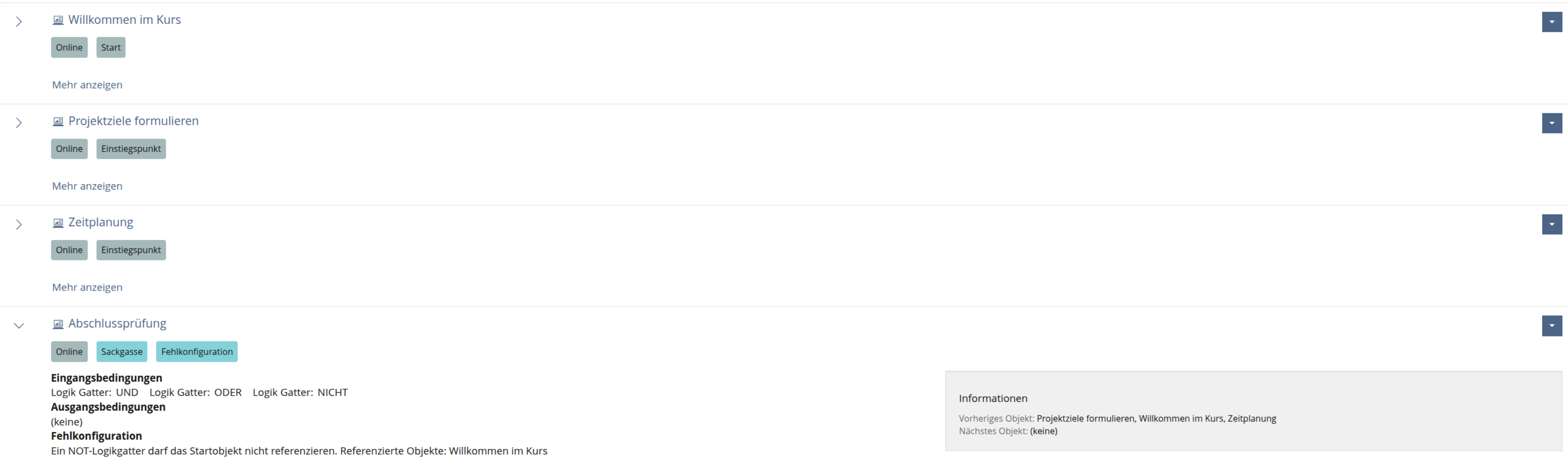
- NOT logic conditions that reference the configured start object,
- points input conditions whose required threshold cannot be reached,
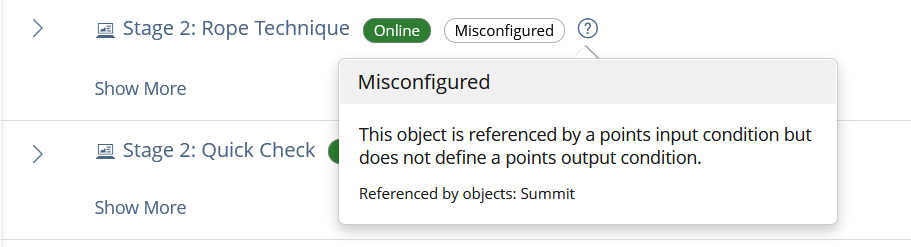
- points input conditions that reference objects without points output conditions,
- contradictory static completion requirements such as the same object being required as completed and not completed.
The feature does not replace runtime navigation checks. It supports authors while configuring adaptive paths and makes problematic static setups visible early.
3 User Interface Modifications
3.1 List of Affected Views
- Learning Sequence > Content > Manage in Adaptive Mode
- Adaptive content table entries
- Misconfiguration detail popover in the adaptive table
3.2 User Interface Details
If an adaptive table entry contains a conflicting static input configuration, a Misconfigured badge is displayed next to the affected object information.
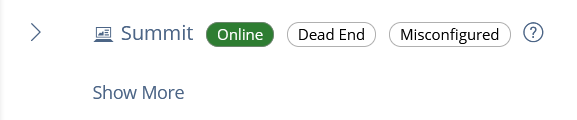
Next to the badge, a help or details trigger opens a popover. The popover explains the concrete problem and may list affected or referenced objects. For points-related issues, it can also show which objects are referenced as points sources and which of them do not provide points output conditions.
3.3 New User Interface Concepts
No new user interface concept is introduced. The feature reuses badges and popovers to add contextual feedback to the existing adaptive content table.
3.4 Accessibility Implications
The badge text and popover content must be available textually and must not rely on color alone. The detail trigger needs an accessible label, and the explanation must identify the affected object and the reason for the warning in understandable language.
4 Additional Information
4.1 Involved Authorities
- Authority to Sign off on Conceptual Changes: Großkopf, Katrin [katrin.grosskopf]
- Authority to Sign off Code Changes: Großkopf, Katrin [katrin.grosskopf], Auerbach, Jeanine [jeanine.auerbach], Clausen, Keven [keven.clausen]
4.2 Technical Aspects
Static input configuration issues are collected for the adaptive content data and exposed to the adaptive table. The table decides per entry whether a misconfiguration badge and a detail popover must be rendered.
The analyzer evaluates input conditions and derives static constraints such as all completed, none completed and any completed. It also checks whether referenced objects are still part of the Learning Sequence and whether points-based conditions can be fulfilled with the configured output conditions.
Runtime learner data is not required for these checks. The feature is limited to static authoring-time configuration issues.
4.3 Privacy
The feature evaluates object configuration data and condition references. It does not introduce new processing of learner-specific personal data.
4.4 Security
No special security-relevant changes. The badge is shown only in the existing Learning Sequence administration context and follows the existing permission checks for managing adaptive content.
4.5 Contact
Person to be contacted in case of questions about the feature or for funding offers: Auerbach, Jeanine [jeanine.auerbach]
4.6 Funding
Funding status and funding parties are listed in the block 'Status of Feature' in the right column of this page.
If you are interested to give funding for this feature, please get into contact with the person mentioned above as 'Contact'.
5 Discussion
Samoila, Oliver [oliver.samoila] as UI-Coordinator, 13 October 2026:
Hello everyone.
Depending on how you handle all the related feature requests, I’d like to refer you here to the feedback on the UI in the ‘Discussion’ section of Feature Request 'Adaptive Learning Paths: Player Redesign'.
This feedback isn’t repeated multiple times across different requests.
JourFixe, ILIAS [jourfixe], 19 OCT 2026: We highly appreciate this suggestion and accept it for trunk with the following modifications:
- Please provide an extension of the UI framework where you can provide tag buttons explicetly and render the in a propriate location (they not be a title and so get into conflict with the real object title).
- Please replace the usage of popovers with help topics (and ensure that these help topics exist within the system). See also here
We accept the KS related changes also in the beta phase of ILIAS 12.
6 Implementation
Feature has been implemented by the KPG team.
Related Feature Requests
6.1 Description and Screenshots
Implemented as been showed in the screenshot:
6.2 Test Cases
With regard to the integration of adaptive learning paths, all test cases for the learning sequence were revised. Below are all modified, new, or deleted test cases of the learning sequence.
Test cases completed at 26 OCT 2026 by Auerbach, Jeanine [jeanine.auerbach]
Modified testcases:
- C24769 : Lernsequenz anlegen
- C63624 : Lernsequenz online/offline setzen
- C49905 : Abschlussseite bearbeiten
- C24775 : Inhalte sortieren
- C24776 : Inhalte löschen
- C24804 : Inhalt anzeigen
- C24908 : Inhalt Bedingungen hinterlegen
- C24909 : Inhalt online / offline schalten
- C58104 : Benachrichtigung über erfolgreichen Abschluss der Lernsequenz
- C24910 : Lernsequenz einsehen
- C24911 : Lernsequenz starten
- C24913 : Lernsequenz Inhalt wechseln über Lernwegempfehlung
- C42467 : ILIAS Lernmodule in einer Lernsequenz bestehen
- C24915 : Lernsequenz unterbrechen
- C24919 : Bearbeitungsstand einer Lernsequenz einsehen
- C42489 : Lernfortschritt eines Objektes manuell auf "Bearbeitet" setzen
- C58105 : Hinweis auf Objekte ohne Kioskmodus
New testcases:
- C96476 : Lernmodus wechseln
- C96477 : Lernkarte im Player
- C96478 : Start- und Zielobjekt festlegen
- C96479 : Bedingungen verwalten
- C96480 : Eingangsbedingung Logik-Gatter
- C96481 : Punkte vergeben und voraussetzen
- C96482 : Eingangsbedingung Teilmenge
- C96483 : Hinweise zur Konfiguration in der Inhaltstabelle
- C96484 : Adaptive Lernsequenz durchlaufen
Deleted testcases:
- C58018 : Lernfortschritt pro Modul
6.3 Privacy
no change required
6.4 Approval
Approved at 28th OCT 2026 by Becker, Matthias [matthias.becker].
Last edited: 28. Oct 2026, 12:54, Becker, Matthias [matthias.becker]