





Feature Wiki
Tabs
Adaptive Learning Paths: Output Conditions
Page Overview
[Hide]- 1 Initial Problem
- 2 Conceptual Summary
- 3 User Interface Modifications
- 4 Additional Information
- 4.1 Involved Authorities
- 4.2 Technical Aspects
- 4.3 Privacy
- 4.4 Security
- 4.5 Contact
- 4.6 Funding
- 5 Discussion
- 6 Implementation
- 6.1 Description and Screenshots
- 6.2 Test Cases
- 6.3 Privacy
- 6.4 Approval
1 Initial Problem
Adaptive Learning Paths need information about what an object contributes to the further learning path after it has been processed. In a purely linear Learning Sequence, it is sufficient to open the next object in the order. For adaptive paths, however, it must be possible to define which states or values an object provides when it is left.
Without Output Conditions, subsequent objects cannot reliably react to whether a previous object has, for example, been completed, not attempted, failed or completed with a certain score.
2 Conceptual Summary
Output Conditions describe which state an object provides for adaptive navigation. They are created on an object of the Learning Sequence and can then be evaluated by Input Conditions of other objects.
The implemented Output Conditions are:
- Always: The condition is always fulfilled. It can be used to open a path independently of learning progress.
- Learning Progress: Not Attempted: The condition is fulfilled if the object has not yet been started by the user.
- Learning Progress: In Progress: The condition is fulfilled if the object has been started but not yet completed.
- Learning Progress: Completed: The condition is fulfilled if the object has been completed.
- Learning Progress: Failed: The condition is fulfilled if the object has been failed.
- Points Output: The object provides a defined score as soon as it has been completed with the learning progress status Completed. These points can be collected and checked by Points Input Conditions; without LP Completed, no Points Output is provided for the further path.
Output Conditions are therefore the outgoing part of an adaptive connection: they define what an object “offers” as soon as its state is evaluated.
3 User Interface Modifications
3.1 List of Affected Views
- Learning Sequence > Content > Manage
- Condition drilldown for adding output conditions
- Condition edit modal / configuration form
3.2 User Interface Details
Output Conditions are created in adaptive content management through the action "Conditions" of an object. The table is shown as a Kitchen Sink Table. Existing Output Conditions can be displayed in each object row, and new conditions can be added through the action menu.


When adding a condition, a drilldown opens. The available Output Conditions are offered there. Learning Progress variants are offered as subentries of the Learning Progress condition.
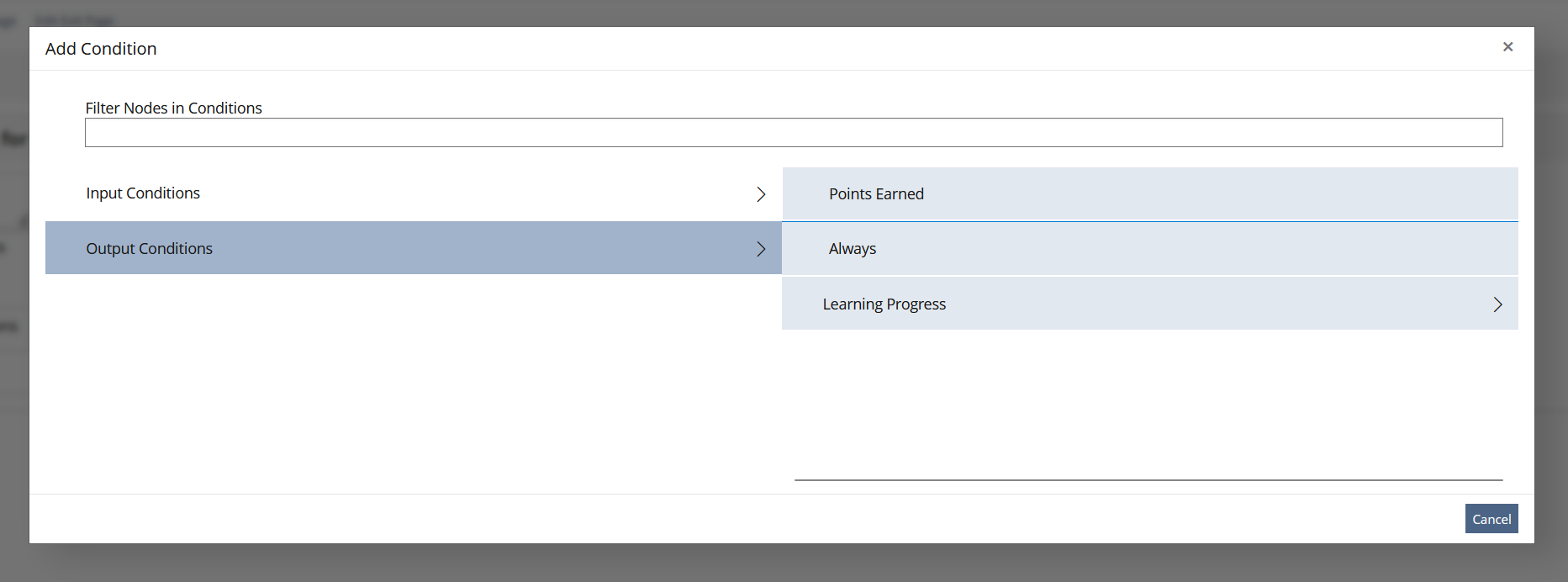

For simple Output Conditions such as Always, no further configuration is necessary. For configured conditions such as Points Output, a form opens in which the score is entered.

Existing conditions can be changed using the edit action. For configurable conditions, the same form is prefilled with the existing values.
Output Conditions use a shared condition concept:
- Conditions are created through an action menu.
- Subtypes are offered in a drilldown.
- Additional values are requested in a form.
- Existing conditions are displayed in the object row of the Presentation Table.
3.3 New User Interface Concepts
No new UI concepts.
3.4 Accessibility Implications
Operation uses Kitchen Sink components such as Presentation Table, Drilldown, Modal and form fields. For accessibility, it is important that condition names and additional values are provided textually and are not recognizable only through icons.
4 Additional Information
4.1 Involved Authorities
- Authority to Sign off on Conceptual Changes: Großkopf, Katrin [katrin.grosskopf]
- Authority to Sign off Code Changes: Großkopf, Katrin [katrin.grosskopf], Auerbach, Jeanine [jeanine.auerbach], Clausen, Keven [keven.clausen]
4.2 Technical Aspects
Output Conditions are discovered automatically. Each Output Condition implements a shared interface and extends the condition base class. The generic tables are:
- lso_condition_types: maps discovered condition classes to a type.
- lso_conditions: stores the Learning Sequence, the object and the condition type for each attached condition.
Condition-specific data is stored in dedicated tables. Examples:
- Learning Progress Output stores the subtype in lso_c_learning_progress_output.
- Points Output stores the score in lso_c_points_output.
- Always does not require a dedicated table.
Evaluation takes place at runtime through the respective condition class. Learning Progress Output checks the learning progress status. Points Output checks whether the object is completed and then provides its configured points value.
4.3 Privacy
Output Conditions can evaluate learning progress data. No new categories of personal data are introduced.
4.4 Security
No special security-relevant changes. Inputs such as point values are processed through form validation.
4.5 Contact
Person to be contacted in case of questions about the feature or for funding offers: Auerbach, Jeanine [jeanine.auerbach]
4.6 Funding
Funding status and funding parties are listed in the block 'Status of Feature' in the right column of this page.
If you are interested to give funding for this feature, please get into contact with the person mentioned above as 'Contact'.
5 Discussion
Kunkel, Matthias [mkunkel], 28 SEP 2026: Thank you very much for this feature request. I have some questions and comments:
- In chapter 2 is written: "Points Output: The object provides a defined score". But if I have understand the behaviour of the LSO correctly, it is not the object itself that provides a sorce or points but the LSO does it for the embedded object. Is that right? These points are not stored with the related object but in the LSO – or is this a misunderstanding?
- The first mockup in chap 3.2 seems to show the input and output conditions of an object that is embedded in the LSO (is "Modul 1 – Element 1" the title of this object?). But how do I get to this screen? It seems the parent screen is missing where I select the embedded objects. It would be nice to have a mockup of this screen in this FR as well.
- Same table in 3.2: IMHO, the ordering of the table columns should be: Name | Type | Sub Type | Details | Actions. And "Name" in ILIAS is usually labeled "Title".
- And still the same table: the data table offers actions for "Input Conditions" and "Output Conditions". But I can't see which actions these are. Could you please list them in the FR? Same for the bulk actions.
- Second screenshot in 3.2: How does the screen look like when I click on "Learning Progress" in the drilldown?
- Third screenshot in 3.2: this "underworld" screen should only provided a "Back" link in the tab row but no other tabs or sub-tabs. We don't want to push users to click on "Metadata" or "Edit Exit Page" while configuring the output conditions of there LSO.
- And last but not least a question concerning the case if multiple input or multiple output conditions are added: Does every condition must be fulfilled? I assume, yes. But it is not mentioned in the text explicitly.
Auerbach, Jeanine [jeanine.auerbach], 30 SEP 2026:
- Yes, that is exactly how it works. Every condition in the LSO has the ability to create and manage database tables. For example, there is the table `lso_c_points_output`, where the corresponding points are mapped to the `condition_id`.
- We have added some mockups. Hope, now it gets clearer. Please mention if that's not the case.
- The labels and the ordering are suitable from our perspective. If we discuss labels and wording together (with you and Potter, Chris [ChrisPotter]), we can revisit this aspect.
- I added some mockups for these.
- I added a mockup for this.
- Yes, we understand the point—that all those tabs and sub-tabs could be removed from the screen—but we find that rather unusual; after all, we are still working within the component as an admin, and we normally have access to all navigation options there.
- In principle, yes—all conditions must be met. However, there can be exceptions regarding input conditions; currently, this applies only to LP input conditions. Specifically: If Item C has two LP conditions (“A completed” and “B completed”), both do not necessarily have to be met. If arriving from A, only the A-edge is checked; if arriving from B, only the B-edge. If C is to be accessible only after both A and B are completed, a LogicGate AND-condition is required.
Lowe, Simon [simon.lowe], 30 SEP 2026: I am a bit confused about the points output option. If I am right, the points are awarded, if the object was successfully completed. So as output condition, there is only one amount of points and it is somehow is equivalent to the learning progess status "Completed".
Is it then possible to define an total amount of points of multiple objects as input condition? Or what is the use case for using the point output?
Auerbach, Jeanine [jeanine.auerbach], 30 SEP 2026: An object with a high score has a higher weighting and contributes to faster progress along the path.
Yes, that's exactly right.
JourFixe, ILIAS [jourfixe], 19 OCT 2026: We highly appreciate this suggestion and accept the feature for trunk.
6 Implementation
Feature has been implemented by {Please add related profile link of this person}
6.1 Description and Screenshots
{ Description of the final implementation and screenshots if possible. }
6.2 Test Cases
Test cases completed at {date} by {user}
- {Test case number linked to Testrail} : {test case title}
6.3 Privacy
Information in privacy.md of component: updated at {date} by {user} | no change required
6.4 Approval
Approved at 21 OCT 2026 by Vorkauf, Klaus [KlausVorkauf].
Last edited: 21. Oct 2026, 11:35, Vorkauf, Klaus [KlausVorkauf]