














Feature Wiki
Tabs
Adaptive Learning Paths: Sequence Mode and Adaptive Mode
Page Overview
[Hide]- 1 Initial Problem
- 2 Conceptual Summary
- 3 User Interface Modifications
- 4 Additional Information
- 4.1 Involved Authorities
- 4.2 Technical Aspects
- 4.3 Privacy
- 4.4 Security
- 4.5 Contact
- 4.6 Funding
- 5 Discussion
- 6 Implementation
- 6.1 Description and Screenshots
- 6.2 Test Cases
- 6.3 Privacy
- 6.4 Approval
1 Initial Problem
Until now, Learning Sequences could mainly be understood as a linear sequence: learning content was managed in a fixed order, and navigation followed this sequence. For Adaptive Learning Paths, however, a purely linear flow is not sufficient. Learners need to be guided to different next objects depending on progress, decisions or other conditions.
To allow the Learning Sequence to support both classic linear scenarios and adaptive learning paths, two learning modes are distinguished: Sequence Mode and Adaptive Mode.
2 Conceptual Summary
The Learning Sequence receives an explicit mode selection.
- Sequence Mode: Content is processed one after another in a fixed, predefined order. This mode corresponds to the familiar linear behavior of the Learning Sequence.
- Adaptive Mode: The learning path is controlled via Entry Point, end object and Input and Output Conditions. Depending on fulfilled conditions, learners can be guided to different objects.
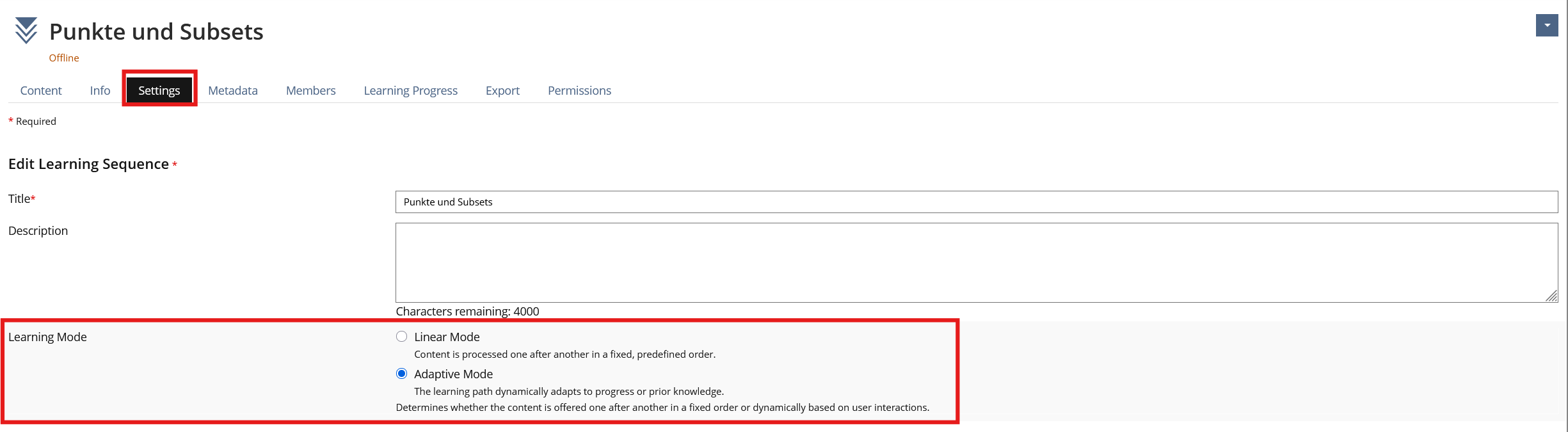
The mode is selected when creating a new Learning Sequence and can later be changed in the settings in the object features area. A Radio Input is used there to choose between Sequence Mode and Adaptive Mode. Both modes are equal operating modes of the same Learning Sequence: Sequence Mode is intended for linear learning scenarios, Adaptive Mode for condition-based paths.
Switching between the two modes is possible at any time. Already configured content and mode-specific settings are not removed. This allows a Learning Sequence to be built sequentially first, extended adaptively later and, if required, operated again in Sequence Mode without losing the adaptive configuration.
For existing Learning Sequences, migration is deliberately conservative: existing Learning Sequences are migrated to Sequence Mode. This preserves the existing behavior and prevents existing courses from being interpreted as adaptive automatically.
In Adaptive Mode, defining an Entry Point and end object is necessary. If these boundaries are missing, this is shown in content management. An adaptive Learning Sequence cannot be operated online in a meaningful way without an Entry Point or end object.
3 User Interface Modifications
3.1 List of Affected Views
- Learning Sequence > Settings
- Learning Sequence > Content > Manage
- Learning Sequence > Player
3.2 User Interface Details
A new section for the learning mode is shown in the settings. The section uses a Radio Input with the options Sequence Mode and Adaptive Mode. The selection describes whether content is offered strictly one after another or dynamically based on user interactions and conditions.
Content management differs depending on the mode:
- In Sequence Mode, content management is shown as a newly built Kitchen Sink Data Table. It supports linear management of objects with sorting, object information, actions and filters.
- In Adaptive Mode, content management is implemented as a Kitchen Sink Presentation Table. This view shows each object as a presentation row with icon, title, description, conditions, status hints and action menu.
The sequence table includes, among other things:
- the linear order of the objects,
- object information and availability,
- actions for managing the sequence,
- filters for targeted restriction of the displayed objects.

The adaptive table includes, among other things:
- Entry Point and end-object markers,
- Input Conditions,
- Output Conditions,
- hints about misconfigurations,
- actions for editing or adding conditions,
- actions for setting Entry Point and end object.
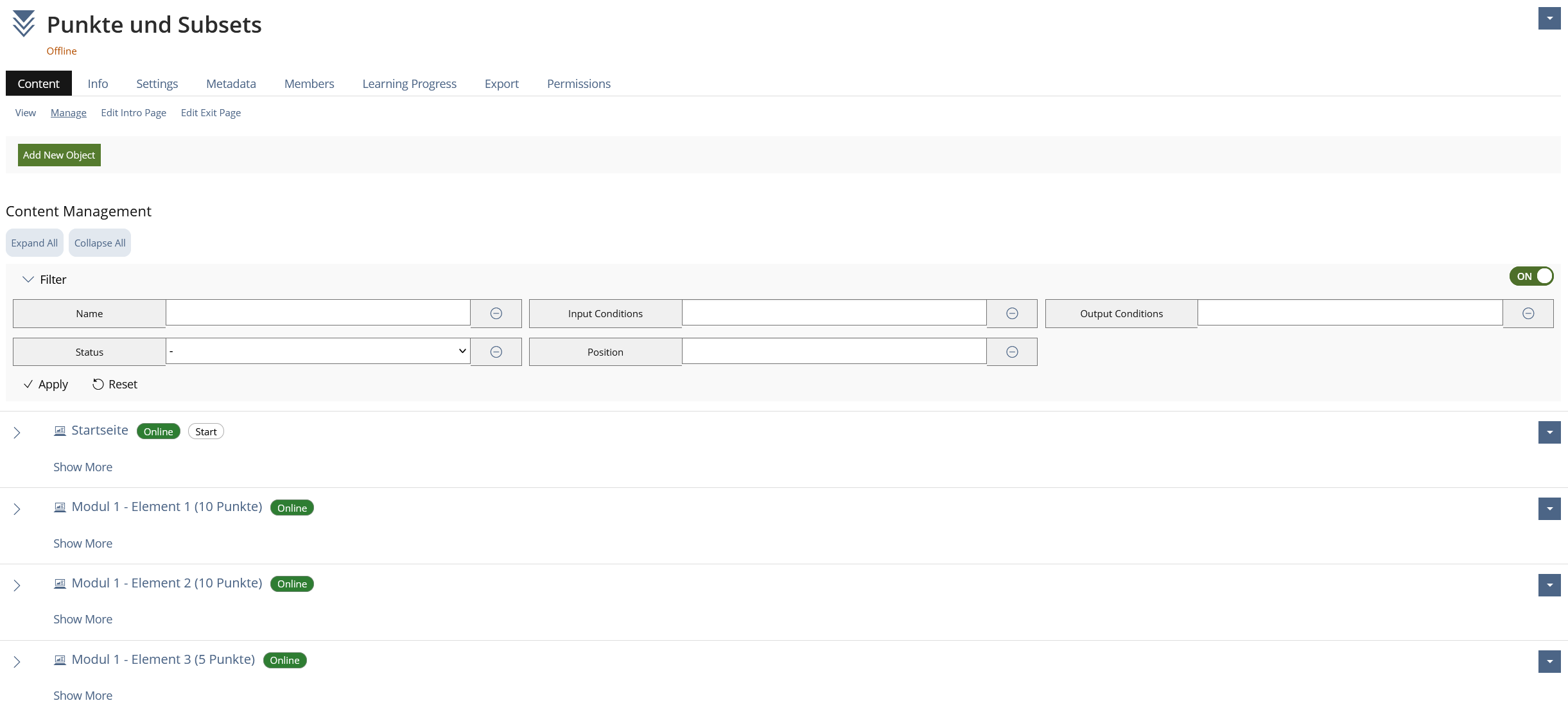
Additional filters are available. In Sequence Mode, they support working with the linear object list. In Adaptive Mode, objects can be narrowed down, among other things, by Input Conditions, Output Conditions, misconfigurations, Entry Point, end object and further status information.
The misconfiguration system checks adaptive configurations already in content management. It points out, among other things, missing references, missing matching counterpart conditions, unreachable paths or incomplete Entry Point/end configurations. The hints are made visible textually in the table and through badges/popovers.
Dead Ends are also considered. If an adaptive path ends at an object without a valid successor being reachable, the user receives corresponding feedback in the Player. The Entry Point, by contrast, defines the entry into the adaptive path and is therefore a central part of online checks and navigation.
Adaptive Mode does not introduce completely new operating logic outside the ILIAS Kitchen Sink concepts, but combines several established elements:
- Radio Input for mode selection,
- Data Table for sequence content management,
- Presentation Table for adaptive content management,
- Drilldown and action menus for condition actions,
- Badges and popovers for misconfigurations.
3.3 New User Interface Concepts
No new UI concepts.
3.4 Accessibility Implications
The implementation uses Kitchen Sink components such as Radio Input, Data Table, Presentation Table, Filter, Actions and Popover. This uses the existing accessibility properties of these components. It is especially important that Entry Point/end information and misconfigurations are presented not only visually but also in a textually understandable way.
4 Additional Information
4.1 Involved Authorities
- Authority to Sign off on Conceptual Changes: Großkopf, Katrin [katrin.grosskopf]
- Authority to Sign off Code Changes: Großkopf, Katrin [katrin.grosskopf], Auerbach, Jeanine [jeanine.auerbach], Clausen, Keven [keven.clausen]
4.2 Technical Aspects
The learning mode is stored in the Learning Sequence. When creating a Learning Sequence, the mode is selected; later it can be changed in the settings. Migrated existing Learning Sequences are set to Sequence Mode so that the previous linear behavior is preserved.
In Sequence Mode, content management is rendered via a Data Table. In Adaptive Mode, it is rendered via a Presentation Table. Entry Point and end objects are stored in dedicated data structures and evaluated when rendering the table and in the Player. If Entry Point or end object is missing, this is shown as a hint; the missing configuration is considered when setting the object online.
Migration sets existing Learning Sequences to Sequence Mode. This avoids existing linear courses suddenly using different navigation logic after an update. Adaptive settings are not deleted during later mode switches, but remain available.
4.3 Privacy
No new personal data is introduced for the mode selection itself. In Adaptive Mode, learning progress data may be used to evaluate conditions.
4.4 Security
No special security-relevant changes beyond the usual checks of the Learning Sequence and the Kitchen Sink components used.
4.5 Contact
Person to be contacted in case of questions about the feature or for funding offers: Auerbach, Jeanine [jeanine.auerbach]
4.6 Funding
Funding status and funding parties are listed in the block 'Status of Feature' in the right column of this page.
If you are interested to give funding for this feature, please get into contact with the person mentioned above as 'Contact'.
5 Discussion
Kunkel, Matthias [mkunkel], 28 SEP 2026: Thank you very much for this promising feature request. I have a suggestion and a question:
- The tables for configuring the LSO in the sequence or adaptive mode have currently the title "Content Management". IMHO these tables are mainly used for the "Navigation Management". In these tables I am defining how users navigate through the Learning Sequence. The term "Content Management" is more focussing on the content itself. So I would suggest the title "Navigation Management". And I would add the chosen mode to it – "Navigation Management (Adaptive Mode)" and "Navigation Management (Sequence Mode)". Final labels could be provided in coorperation with .
- In 3.2. second-to-last paragraph, a "misconfiguration system" is mentioned. But there is no further description of this system. It would be very helpful to know more about this system, where it is available, how it works, what we get as feedback a.s.o.
Auerbach, Jeanine [jeanine.auerbach], 29 SEP 2026:
- We want to discuss the final labels and wording with you and Potter, Chris [ChrisPotter], as I already mentioned this in an email to Chris and you.
- The mentioned misconfiguration system is described in an additional FR, see Adaptive Learning Paths: Misconfiguration Badge for Adaptive Learning Sequences.
JourFixe, ILIAS [jourfixe], 19 OCT 2026: We highly appreciate this suggestion and accept the feature for trunk. Please add a short cross-reference to the section about tags in the presentation table that links to the related FR Adaptive Learning Paths: Misconfiguration Badge for Adaptive Learning Sequences. This would be helpful to be able to follow the discussion and decision about this UI change.
6 Implementation
Feature has been implemented by {Please add related profile link of this person}
6.1 Description and Screenshots
{ Description of the final implementation and screenshots if possible. }
6.2 Test Cases
Test cases completed at {date} by {user}
- {Test case number linked to Testrail} : {test case title}
6.3 Privacy
Information in privacy.md of component: updated at {date} by {user} | no change required
6.4 Approval
Approved at 21 OCT 2026 by Vorkauf, Klaus [KlausVorkauf].
Last edited: 21. Oct 2026, 11:37, Vorkauf, Klaus [KlausVorkauf]