














Feature Wiki
Tabs
Adaptive Learning Paths: Player Redesign
Page Overview
[Hide]- 1 Initial Problem
- 2 Conceptual Summary
- 3 User Interface Modifications
- 4 Additional Information
- 4.1 Involved Authorities
- 4.2 Technical Aspects
- 4.3 Privacy
- 4.4 Security
- 4.5 Contact
- 4.6 Funding
- 5 Discussion
- 6 Implementation
- 6.1 Description and Screenshots
- 6.2 Test Cases
- 6.3 Privacy
- 6.4 Approval
1 Initial Problem
The previous Player of a Learning Sequence was designed for largely linear navigation. Adaptive Learning Paths, however, require more situations: a next object can be blocked, there can be several permitted next objects, a path can lead to a dead end, or navigation can be supported by a map.
The Player must present these situations understandably and guide learners safely through adaptive paths.
2 Conceptual Summary
The Player was extended for Adaptive Mode. It detects different adaptive situations:
- Straight: There is exactly one meaningful continuation.
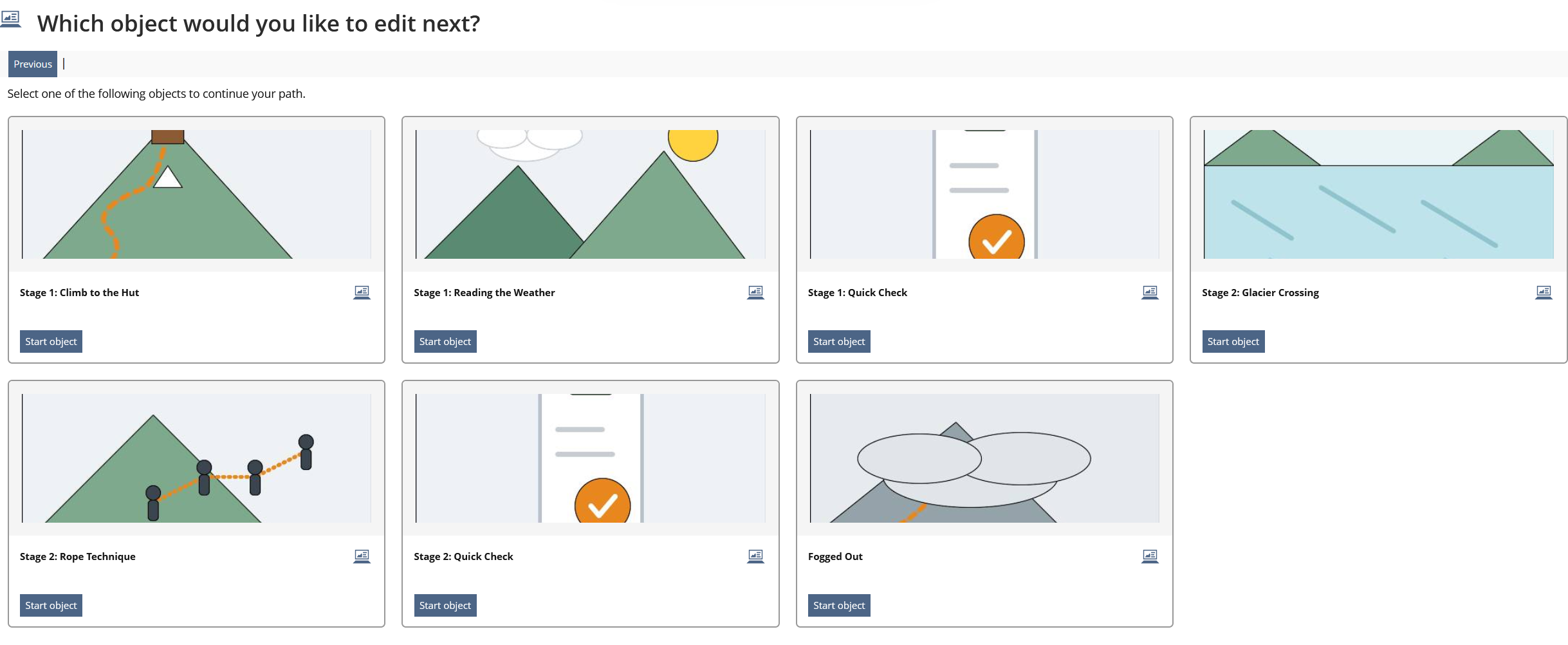
- Branch: There are several possible next objects; learners must select one.
- Blocked: The next object cannot yet be started because a condition is not fulfilled.
- Dead End: There is no meaningful continuation in the current path.
- End: The end object or the end of the path has been reached.
For branches, a dedicated selection page is built. It shows the possible next objects as cards with icon or tile image, title, description and start action. This separates object selection from the actual learning object and presents it as a clear intermediate page.
For Dead Ends, there is a dedicated Dead End page with explanatory text and illustration. Blocked situations are explained with an info message.
The Learning Map is available in the Player and supports orientation within the adaptive path. It makes visible where learners are located in the path and which structures exist.
The Learning Map is integrated into the Player as an orientation aid. It shows the learning path structure and supports switching or understanding the current position.

Straight
Upon clicking the "Next" button, the user is taken directly to the next learning content.

Branch
If the Player detects a branch, a selection page is displayed. This page contains a friendly heading, a short explanation and a card display of the selectable objects.
Blocked
If an object is blocked, an information message is displayed. It explains that a condition must be fulfilled before the next object can be started.

Dead End
If the path leads to a dead end, a Dead End page is displayed. This separates the dead-end information from the normal object content and makes it clearer that no suitable continuation is available.

end
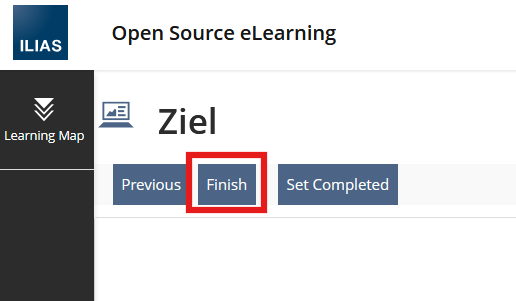
The End object of the LSO has a Finish Button which closes the Player and the user gets directed to the Exit Page.
3 User Interface Modifications
3.1 List of Affected Views
- Learning Sequence > Player
- Adaptive branch selection page
- Adaptive dead-end page
- Learning Map inside the Player
3.2 User Interface Details
The Player introduces several adaptive intermediate situations as dedicated displays:
- selection page for several successors,
- Dead End page,
- blocked continuation with info message,
- Learning Map for orientation.
The selection page uses Kitchen Sink cards and buttons. The content of the cards is built from the Learning Sequence objects, including title, description, icon and optional tile image.
3.3 New User Interface Concepts
The Main Menu of the Player includes the Learning Map which is a new concept described in Adaptive Learning Paths: Learning Map.
3.4 Accessibility Implications
Cards need meaningful titles, descriptions and buttons. Tile images must not carry the object information on their own; title and start action must be available textually.
For Dead Ends and blocked objects, it is important that the cause is explained clearly in text. The Learning Map must not convey status information exclusively through color.
4 Additional Information
4.1 Involved Authorities
- Authority to Sign off on Conceptual Changes: Großkopf, Katrin [katrin.grosskopf]
- Authority to Sign off Code Changes: Clausen, Keven [keven.clausen], Großkopf, Katrin [katrin.grosskopf], Auerbach, Jeanine [jeanine.auerbach]
4.2 Technical Aspects
In Adaptive Mode, the Player uses position and navigation logic. Methods for determining the current position, moving forward/backward, jumping directly and detecting the situation encapsulate adaptive navigation.
Situation detection classifies the current state as end, blocked, deadend, branch or straight. Branch selection and Dead End hints are no longer appended directly to the object content, but rendered through dedicated intermediate pages.
The selection page is created through a reusable builder. It renders a card with object information and start button for each selectable successor. The Dead End page uses dedicated Player texts and an illustration.
4.3 Privacy
The Player processes learner-specific navigation and learning progress data to determine adaptive situations. No new categories of personal data are introduced.
4.4 Security
No special security-relevant changes. Access to objects remains bound to the existing Learning Sequence and ILIAS permission checks.
4.5 Contact
Person to be contacted in case of questions about the feature or for funding offers: Auerbach, Jeanine [jeanine.auerbach], Clausen, Keven [keven.clausen]
4.6 Funding
Funding status and funding parties are listed in the block 'Status of Feature' in the right column of this page.
If you are interested to give funding for this feature, please get into contact with the person mentioned above as 'Contact'.
5 Discussion
Kunkel, Matthias [mkunkel], 30 SEP 2026: Thanks for this feature request. Two questions / comments:
- Status "blocked": wouldn't it be possible to notify the user what condition must be fulfilled? This would be helpful for a learner.
- Status "end": why is there a "Finish" button and a "Set completed" button? A "Set completed" button appears for embedded objects where the LP can be set to completed. But if I understand this screen correctly, it is a final screen without embedded object, right? So what can set to completed here? Or do I have misunderstood the request?
- And in addition: it would be nice to have also some image on the end screen like on the dead end screen. This would make clear that I have completed the learning sequence. Or do you show the content defined for the "Exit Page"?
Auerbach, Jeanine [jeanine.auerbach], 02 OCT 2026:
1. Determining the ideal solution for this could be part of a future development phase; in particular, a truly effective UI/UX would need to be designed. For the time being, it is already possible—as Keven and Daniel demonstrated at the Dev Conf—to include relevant notes in the object description, which is also displayed in LearningMap.
2. This is simply the last object in the LSO, and that is how it has always been. It is not the exit page. Depending on the LP configuration, the object can be set to "completed," and "Finish" then terminates the LSO and redirects to the exit page.
3. This must be configured on the exit page.
Samoila, Oliver [oliver.samoila] as UI-Coordinator, 02 October 2026:
Hello everyone.
Thank you very much for the various contributions to the development of the LSO.
Following the initial presentation of the ideas and their implementation at the Development Conference in Hamburg, Keven, Janine, Thibeau and I have been discussing the UI in depth. Thibeau and I are acting as UI coordinators. We would like to share a few key points from these discussions.
- We very appreciate that, as part of the development process, the existing UI in various places has been migrated to the UI from the UI framework. Tables, for example, are included in this. (The ‘Removing Legacy UI’ project also benefits from this.)
- We have focused on two aspects in particular: a) the LSO-exclusive ‘Learning Map’ and b) the ‘Content Management’ presentation table.
- LSO-exclusive ‘Learning Map’
- This UI was created for a very specific purpose. There is currently no other identical or similar use case that requires such a solution. It is recommended that this UI be maintained within the context of the LSO. A basic analysis of this will follow at the end of this discussion post.
- In my view, this also correctly allocates the necessary resources for maintenance.
- Presentation Table ‚Content Management‘
- The Presentation Table is being used in a very positive way here, and we also understood from Keven and his colleague Daniel that they were really impressed with the possibilities offered by this UI component.
- With regard to the UI solution used here – which most closely appears to be a ‘UI tag’ – our preference is either to use existing UI elements or to address existing UI elements with proposed enhancements. In the best-case scenario, the UI framework could also benefit from this, and consequently other parts of ILIAS as well. We should therefore come up with a solution for this either before ‘Coding Complete’ or, at the latest, during the beta phase. This aspect could be included in the approval as a ‘condition’, but it should not affect the approval of the feature itself.
To make this as clear as I possibly can, and at the same time keep our options open for sensible decisions in the future: with ILIAS, we naturally wish to establish the UI framework, extend it, and provide ILIAS with a consistent, predictable and learnable UI.If there are good reasons for a unique solution, there may also be good reasons for a UI element to be created for a very specific purpose and then maintained by the authority responsible for the component in which that UI is used.If we need a UI for n > 1 cases, then the approach should be to use the UI framework. This should also apply if we initially assume a unique solution but then identify n > 1 use cases.
I don't want us to tackle this with an unnecessarily complex set of rules, but rather with common sense, pragmatism and proportionality. So please feel free to discuss things with your UI coordinators during the development process.
Samoila, Oliver [oliver.samoila] as UI-Coordinator, 13 October 2026:
Hello everyone.
Just a quick note in advance, as I won’t be able to attend the regular meeting.
Unfortunately, we didn’t get to discuss and evaluate what’s shown under the heading ‘BRANCH’ together. So here’s my feedback in text form.
At this stage – and this is just my guess – we shouldn’t be working with any sort of custom HTML or custom styling of an existing UI component. I’m assuming that the cards here involve a reorganisation of all component elements. In my view, this becomes rather fragile quite quickly and really does run counter to the goals we’re trying to achieve with a common UI framework.
Please use the Cards as they are provided in the UI framework, or, for example, the Entity Grid. Alternatively, you are welcome to suggest extensions and/or changes to UI components.
Many thanks.
JourFixe, ILIAS [jourfixe], 19 OCT 2026: We highly appreciate this suggestion and accept it for trunk with the following change:
- Please replace the custom UI used in the 'Branch' view for showing the object one can click on with Entity Grid Listing or plain Deck and Cards.
We accept the KS related changes also in the beta phase of ILIAS 12.
6 Implementation
Feature has been implemented by {Please add related profile link of this person}
6.1 Description and Screenshots
{ Description of the final implementation and screenshots if possible. }
6.2 Test Cases
Test cases completed at {date} by {user}
- {Test case number linked to Testrail} : {test case title}
6.3 Privacy
Information in privacy.md of component: updated at {date} by {user} | no change required
6.4 Approval
Approved at {date} by {user}.
Last edited: 19. Oct 2026, 15:09, Kunkel, Matthias [mkunkel]