


























Feature Wiki
Tabs
Compare Current and New Settings (related to Adopt Settings From Other SCORM Modules)
Page Overview
[Hide]- 1 Initial Problem
- 2 Conceptual Summary
- 3 User Interface Modifications
- 4 Additional Information
- 4.1 Involved Authorities
- 4.2 Technical Aspects
- 4.3 Privacy
- 4.4 Security
- 4.5 Contact
- 4.6 Funding
- 5 Discussion
- 6 Implementation
- 6.1 Description and Screenshots
- 6.2 Test Cases
- 6.3 Privacy
- 6.4 Approval
1 Initial Problem
With the feature Adopt Settings From Other SCORM Modules it will be possible to adopt the settings from another SCORM module. This will make it easier to get the settings right.
However, you need to open the settings of the SCORM module you want to adopt the settings from to see which options are selected. The feature "Compare Current and New Settings" introduces a comparison between the settings, so one can see which settings will be changed before adopting them.
2 Conceptual Summary
After a SCORM module is selected for adopting the setting from it, a comparision with the divergent settings will be shown.
3 User Interface Modifications
3.1 List of Affected Views
- The view that will be created for the feature Adopt Settings From Other SCORM Modules will show the comparison
3.2 User Interface Details
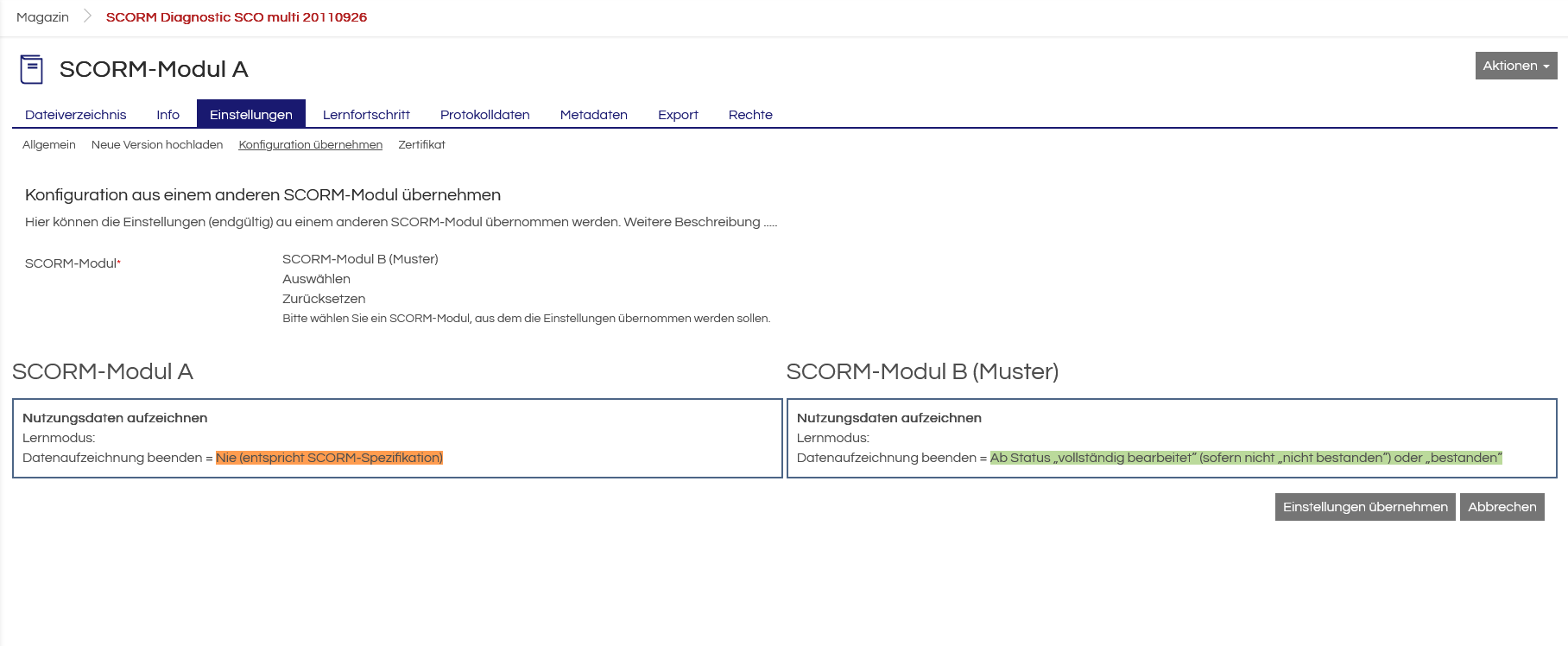
The view will show the differences in the settings between the current module and the selected module (see mockup).
3.3 New User Interface Concepts
When the feature will be implemented it sould be determined which UI component is best for showing the comparison.
3.4 Accessibility Implications
The use of existing UI components does not introduce any new implications for accessibility.
4 Additional Information
4.1 Involved Authorities
- Authority to Sign off on Conceptual Changes: Wischniak, Stanislav [wischniak]
- Authority to Sign off Code Changes: Dahme, Daniel [qualitus.dahme], Hartwig, Alex [hartwig@qualitus.de]
4.2 Technical Aspects
Depending on the desicion in 3.3.
4.3 Privacy
No new personal data is collected or processed as a result of the implementation of the feature.
4.4 Security
The implementation of the feature does not introduce any new attack vectors.
The only security relevant consideration needed is to decide which permission needs to be granted for showing a SCORM module in the selection view.
4.5 Contact
Person to be contacted in case of questions about the feature or for funding offers: Wischniak, Stanislav [wischniak], Mix, Eva [emix]
4.6 Funding
Funding status and funding parties are listed in the block 'Status of Feature' in the right column of this page.
If you are interested to give funding for this feature, please get into contact with the person mentioned above as 'Contact'.
5 Discussion
6 Implementation
Feature has been implemented by {Please add related profile link of this person}
6.1 Description and Screenshots
{ Description of the final implementation and screenshots if possible. }
6.2 Test Cases
Test cases completed at {date} by {user}
- {Test case number linked to Testrail} : {test case title}
6.3 Privacy
Information in privacy.md of component: updated at {date} by {user} | no change required
6.4 Approval
Approved at {date} by {user}.
Last edited: 22. Jan 2026, 11:15, Mix, Eva [emix]