








Feature Wiki
Tabs
Booking Pool: Revision of List View in tab ›› Bookable Items
Page Overview
[Hide]- 1 Initial Problem
- 2 Conceptual Summary
- 2.1 Week View
- 2.2 List View ›› Table View
- 3 User Interface Modifications
- 4 Additional Information
- 4.1 Involved Authorities
- 4.2 Technical Aspects
- 4.3 Privacy
- 4.4 Security
- 4.5 Contact
- 4.6 Funding
- 5 Discussion
- 6 Implementation
- 6.1 Description and Screenshots
- 6.2 Test Cases
- 6.3 Privacy
- 6.4 Approval
1 Initial Problem
With the features Week View for Booking Tool, Abandon the booking of different time slots within one reservation process and Improvement of the booking process in Booking Tools with Fixed Schedules it is not possible to book several bookable items from ILIAS 9 on.
This limits the booking process:
- There is no way to book all time slots of one bookable item e.g. for the whole day.
- There is no way to book different bookable items for one or more time slots.
The ILIAS Community stated this as a problem within different mantis reports and a feature workshop.
In addition, the list view is offered for Booking Pools with a fixed schedule, but at the end the booking process always redirects the user to the week view. Therefore the list view can be replaced from our point of view.

 Action "Book" at List View
 Redirection to the Week View of the Bookable Item
We identified the main problem in the different scenarios for the Booking Pool: Some offering a lot of Bookable Items and a lot of time slots and others just offering a few. With a large number of Bookable Items / time slots, the Week View currently is not usable.
 Example for not usable week view
2 Conceptual Summary
Our aim is to offer the described needs (see above) with replacing the list view (see above) by a table view and keeping the week view. With this replacement the Table View and the Week View will be completely separated. Bookings can be made at the Table View OR at the Week View.
2.1 Week View
The Week View will stay as it is and issues with it are out of the scope of this Feature Request. We made a few improvements at the Week View in order to make the booking process more user friendly (e.g. redirect to the same week after making a booking). If funding is found, more improvements for the Week View can be implemented.
2.2 List View ›› Table View
The List View will completely replaced by a new Table View. At this View, all Bookable Items and time slots of the Booking Pool are potentially shown. In order to not show too many entries at the table, filters are available and will be pre-set.
The table view allows the user to book Bookable Items in two ways:
- Use the action "Book" at one Bookable Item / Time Slot (row) of the table.
- The modal for completing the booking with the possibilty to enter a message is shown (as today).
- Only one booking is made.
- Checking the checkbox of multiple Bookable Items / Time Slots (rows) and use the Bulk Actions underneath the table.
- The modal for completing the booking with the possibilty to enter a message is shown. One message for every picked Bookable Item can be entered.
- If some Bookable Items / Time Slots are not available anymore, they won't be listed. A message box informs the user about this.
- Several bookings are made, if possible.
3 User Interface Modifications
3.1 List of Affected Views
- Booking Pool with Fixed Schedule ›› Bookable Items
- Booking Pool with Direct Booking ›› Bookable Items
- Booking Pool with Using Preferences ›› Bookable Items
- Booking Pool ›› Modal Booking Confirmation
3.2 User Interface Details
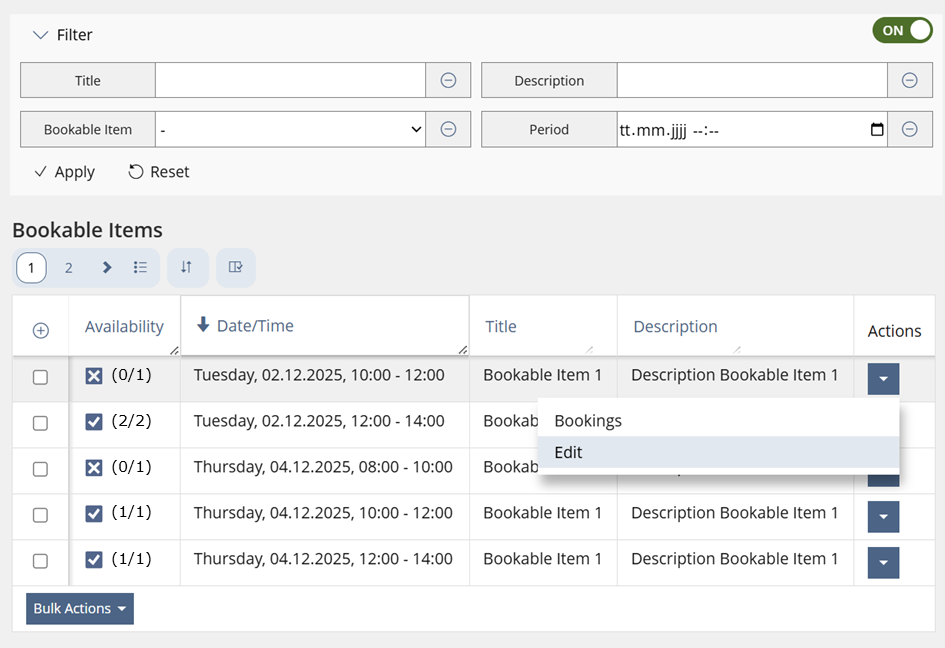
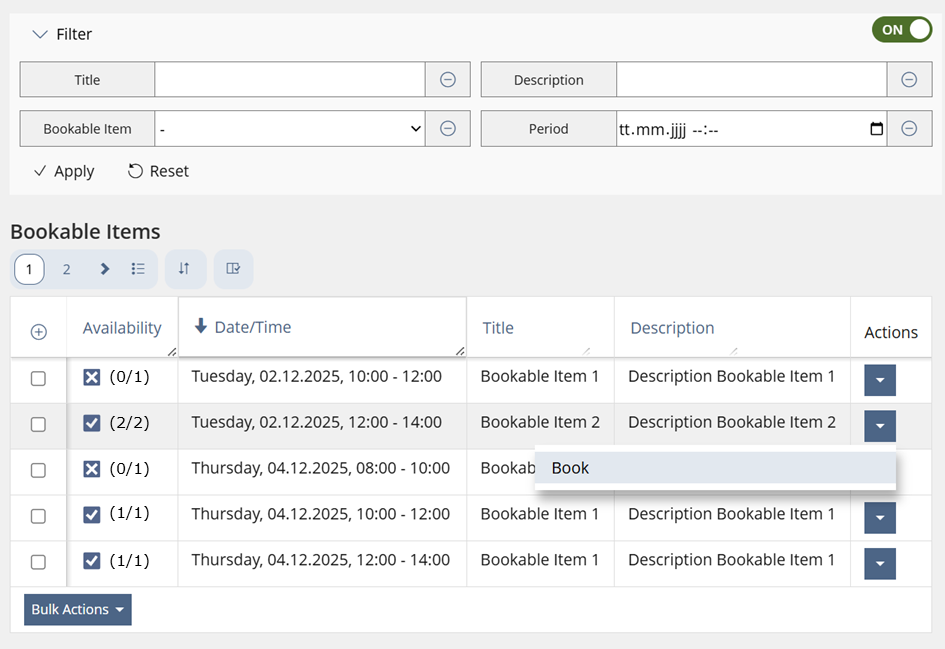
3.2.1 Booking Pool with Fixed Schedule ›› Bookable Items
At the top of the screen, the view control only will be changed slightly: The word "List" will be changed to "Table".
As filters above the table there will be:
- Text: Title
- Text: Description
- Multi Selection: Bookable Items
- Period: Start and End Date
The data table will show the following columns:
- Checkbox
- Availability: Icon (is available for booking or not) and available number of bookings
- Time/Date: Full Date with time period of the time slot
- Title of Bookable Item
- Description of Bookable Item
- Actions
Screen from administrative perspective

Screen from user perspective
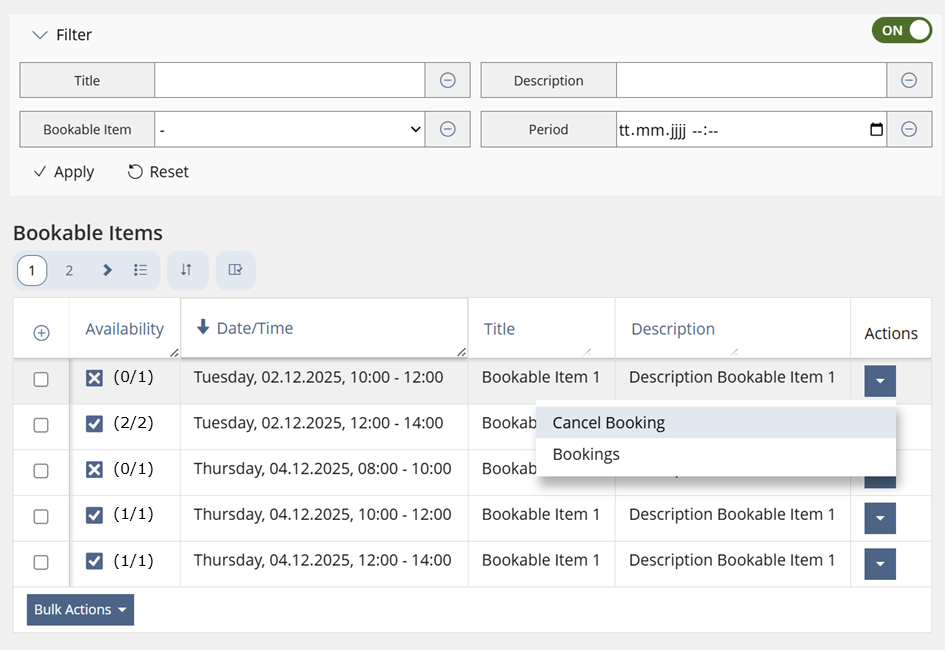
3.2.2 Booking Pool with Direct Booking ›› Bookable Items
The screen for Booking Pools with Direct Booking mode will be pretty the same with the following restrictions.
As filters above the table there will be only:
- Text: Title
- Text: Description
- Multi Selection: Bookable Items
The data table will show the following columns only:
- Checkbox
- Availability: Icon (is available for booking or not) and available number of bookings
- Title of Bookable Item
- Description of Bookable Item
- Actions
The availabe Actions will be the same as above, because users are still able to make bookings.
3.2.3 Booking Pool with Using Preferences ›› Bookable Items
The screen for Booking Pools with Using Preferences mode will be the same as it is at the Direct Booking mode.
As filters above the table there will be only:
- Text: Title
- Text: Description
- Multi Selection: Bookable Items
The data table will show the following columns only:
- Checkbox
- Availability: Icon (is available for booking or not) and available number of bookings
- Title of Bookable Item
- Description of Bookable Item
- Actions
The availabe Actions will be the same as above, because administrative users are still able to make bookings.
3.2.4 Booking Pool ›› Modal Booking Confirmation
The modal in order to confirm the booking stays at it is at the Week View.

At the Table View, the user is able to book multiple Bookable Items / Time slots. Therefore the modal will have all selected Time Slots listed and a message can be entered for every Bookable Item.

3.3 New User Interface Concepts
No new UI-concepts needed, because the KitchenSink data table will be used.
3.4 Accessibility Implications
No accessibility implications expected beause of the use of KitchenSink UI.
4 Additional Information
4.1 Involved Authorities
- Authority to Sign off on Conceptual Changes: Samoila, Oliver [oliver.samoila], Lowe, Simon [simon.lowe]
- Authority to Sign off Code Changes: Joußen, Thomas [tjoussen]
4.2 Technical Aspects
{ Necessary technical information have to be provided here, e.g. dependencies on other ILIAS components, necessary modifications in general services/architecture, potential security or performance issues. }
4.3 Privacy
No changes due to privacy.
4.4 Security
No changes due to security.
4.5 Contact
Person to be contacted in case of questions about the feature or for funding offers: Lowe, Simon [simon.lowe]
4.6 Funding
Funding status and funding parties are listed in the block 'Status of Feature' in the right column of this page.
If you are interested to give funding for this feature, please get into contact with the person mentioned above as 'Contact'.
5 Discussion
JourFixe, ILIAS [jourfixe], 26 JAN 2026: We highly appreciate this suggestion and accept the feature for trunk. As it seems that the mockups above do not use the right icon for 'unchecked', please add updated screenshots once the feature has been implemented (chap. 6).
JourFixe, ILIAS [jourfixe], 27 APR 2026: We highly appreciate these suggestions and accept them for ILIAS 11, too. Please take care of testing these changes short before the stable and update the test cases accordingly. The feature originally scheduled for 12 will now already be available in 11.
Within the implementation and testing, we encountered the following problems and therefore had to expand this Feature Request in two places:
View Control (Table / Week)
In this Feature Request it was documented, that the Week View is not changed. This is still correct, but we came to the fact, that for accounts with read permissions it was not possible to directly access the Week View. It was only presented in the second step of the booking process.
Therefore we have introduced the view control (Table / Week), which previously only was shown for accounts with edit permissions, also for accounts with read permissions.
Period Filter
With this Feature Request we have introduced a new table, which shows all bookable items and time slots. In big Booking Pools this could be a problem.
Because we are not able to limit the number of lines of the table, we decided to expand the setting "Default Value for ‘Period’ Filter". This default value now applies to the bookings tab and the bookable items tab.

JourFixe, ILIAS [jourfixe], 01 JUN 2026: We highly appreciate this suggestion and accept the extension of the feature request as described above by Simon.
6 Implementation
Feature has been implemented by {Please add related profile link of this person}
6.1 Description and Screenshots
{ Description of the final implementation and screenshots if possible. }
6.2 Test Cases
Test cases adjusted at 22 JUN 2026 by Lowe, Simon [simon.lowe]
Test cases deleted at 20 JUL 2026 byLowe, Simon [simon.lowe]:
- C50167 : Book recurrent dates in List View
6.3 Privacy
Information in privacy.md of component: updated at {date} by {user} | no change required
6.4 Approval
Approved at {date} by {user}.
Last edited: 20. Jul 2026, 13:08, Lowe, Simon [simon.lowe]