
















Feature Wiki
Tabs
Introducing Global Navigation
Page Overview
[Hide]- 1 Initial Problem
- 2 Conceptual Summary
- 2.1 Goals
- 2.2 Proposed Solution
- 2.2.1 Navigation entry point
- 2.2.2 Context-sensitive drill-down menu
- 2.2.3 Current location and active path
- 2.2.4 Direct links and deep links
- 2.2.5 Relationship to breadcrumbs
- 2.2.6 Relationship to the Repository Tree
- 2.2.7 Mobile Requirements
- 2.2.8 Summarized Functional Requirements
- 2.2.9 Relationship to Course and Group Table of Contents
- 3 User Interface Modifications
- 4 Additional Information
- 4.1 Involved Authorities
- 4.2 Technical Aspects
- 4.3 Privacy
- 4.4 Security
- 4.5 Contact
- 4.6 Funding
- 5 Discussion
- 6 Implementation
- 6.1 Description and Screenshots
- 6.2 Test Cases
- 6.3 Privacy
- 6.4 Approval
1 Initial Problem
Currently, ILIAS does not provide a user‑friendly global navigation that is fully reliable and consistently communicates the user’s current location within the system. This can make orientation difficult, especially for typical end users.
Users can access repository objects through a mixture of navigation mechanisms:
- Repository (Tree View, Last Visited, My Courses and Groups, Repo - Main page)
- Breadcrumbs
- Direct links and deep links
- Dashboard
- Object-specific navigation elements (e.g. Blog or Forum)
- Browser history
These mechanisms do not consistently communicate where a user is, where the user can go next, or how to return to a relevant parent level. As a result, navigation in ILIAS often requires users to understand the technical repository structure rather than supporting them in completing their actual task. The central problem is not merely that individual elements are difficult to use. The central problem is that ILIAS lacks a single, globally available orientation and navigation mechanism that enables users to:
- Understand their current location
- See relevant parent levels
- Move to a parent level
- Explore nearby or deeper levels
- Navigate to another relevant repository area
- Recover their orientation after opening a direct or external link
- Use the same interaction principle on desktop, tablet and smartphone
The current situation creates a particularly difficult experience for users who enter ILIAS-Objects through direct links. A direct link may open a deeply nested folder, file, exercise, learning module or other object. In this case, users often do not know:
- Which container the object belongs to
- Which structure surrounds the object
- How to return to the parent container
- Which contents are available on the same level
- Whether there are related learning materials, assignments, announcements or organisational information nearby
The breadcrumb path provides orientation most reliably, yet due to permission settings it can display misleading information (see Mantis #45844). Moreover, breadcrumbs should act only as a secondary navigation aid (see analysis). Additional usability issues related to breadcrumbs have been identified in Mantis #45836 and Mantis #44551.
The tree view, a potential alternative for navigation, also fails to indicate the current location within the repository. It is cluttered, difficult to read, and therefore unsuitable for providing users with a clear orientation within ILIAS (see analysis).
Navigating "upwards" in the repository is therefore difficult, particularly when the user did not start their journey at a container landing page. The existing navigation elements do not sufficiently solve this problem:
Existing mechanism | Limitation |
|---|---|
Breadcrumbs | Helpful as a secondary orientation aid, but difficult to discover, visually subtle, unreliable in some permission scenarios and not sufficient as the primary global navigation |
Repository Tree | Can represent hierarchy, but is cluttered, difficult to scan, does not provide a sufficiently clear location model and is not intuitive for many users |
Tools menu (e.g. learning modules) | A generic technical category, not a meaningful or discoverable place for primary repository navigation |
Direct links | Efficient for reaching a target object, but provide insufficient support for understanding the surrounding structure |
Browser back button | May return users to a previous technical navigation state, but does not reliably communicate or reconstruct the repository context |
Dashboard (e.g. favourites) | Efficient for reaching a target object, but provide insufficient support for understanding the surrounding structure |
These issues have existed for over 15 years (see FR) and continue to appear in more recent usability tests (see task 1 and task 6). Further tests conducted together with bwOER-Connect and leifos revealed that, especially on small screens, none of the participants were able to navigate back to higher levels, as they could not locate the breadcrumbs.
A recent needs assessment Igniting ILIAS Innovation reinforces and broadens this evidence. It shows that navigation and orientation are not isolated issues, but a central usability problem with direct consequences for content discovery, mobile use, satisfaction and perceived quality of ILIAS.
2 Conceptual Summary
2.1 Goals
The proposed global navigation should provide a reliable, accessible and responsive way to navigate the repository. It must support both orientation and movement through hierarchical structures. The global navigation should enable users to:
- Identify their current repository location
- Recognise the hierarchy leading to the current object
- Navigate directly to parent nodes
- Explore child nodes progressively
- Return to a meaningful course, group, category or repository context after following a direct link
- Access relevant navigation without relying on technically named tools
- Use the same underlying interaction concept across all devices and screen sizes
- Operate the navigation with keyboard, touch and assistive technologies
- Retain orientation when moving across repository levels
The global navigation should be designed around the following principle:
Users should be able to understand where they are in ILIAS, where they came from and where they can go next without needing to understand the technical repository tree.
2.2 Proposed Solution
Introduce a new global repository navigation based on a contextual drill-down menu.
The navigation should be implemented as a dedicated Main Control and made available through the Slate. It should be prominently reachable from the Main Bar or another globally persistent location that is clearly understood as navigation. It must not be concealed exclusively under "Tools", because "Tools" is not a user-centred mental model for exploring the repository structure or understanding the current location.
The proposed menu combines:
- A globally available navigation entry point
- A context-sensitive repository hierarchy
- Stepwise drill-down navigation
- Explicit navigation to parent and child levels
- Persistent indication of the current object and its path
- A responsive Slate-based presentation
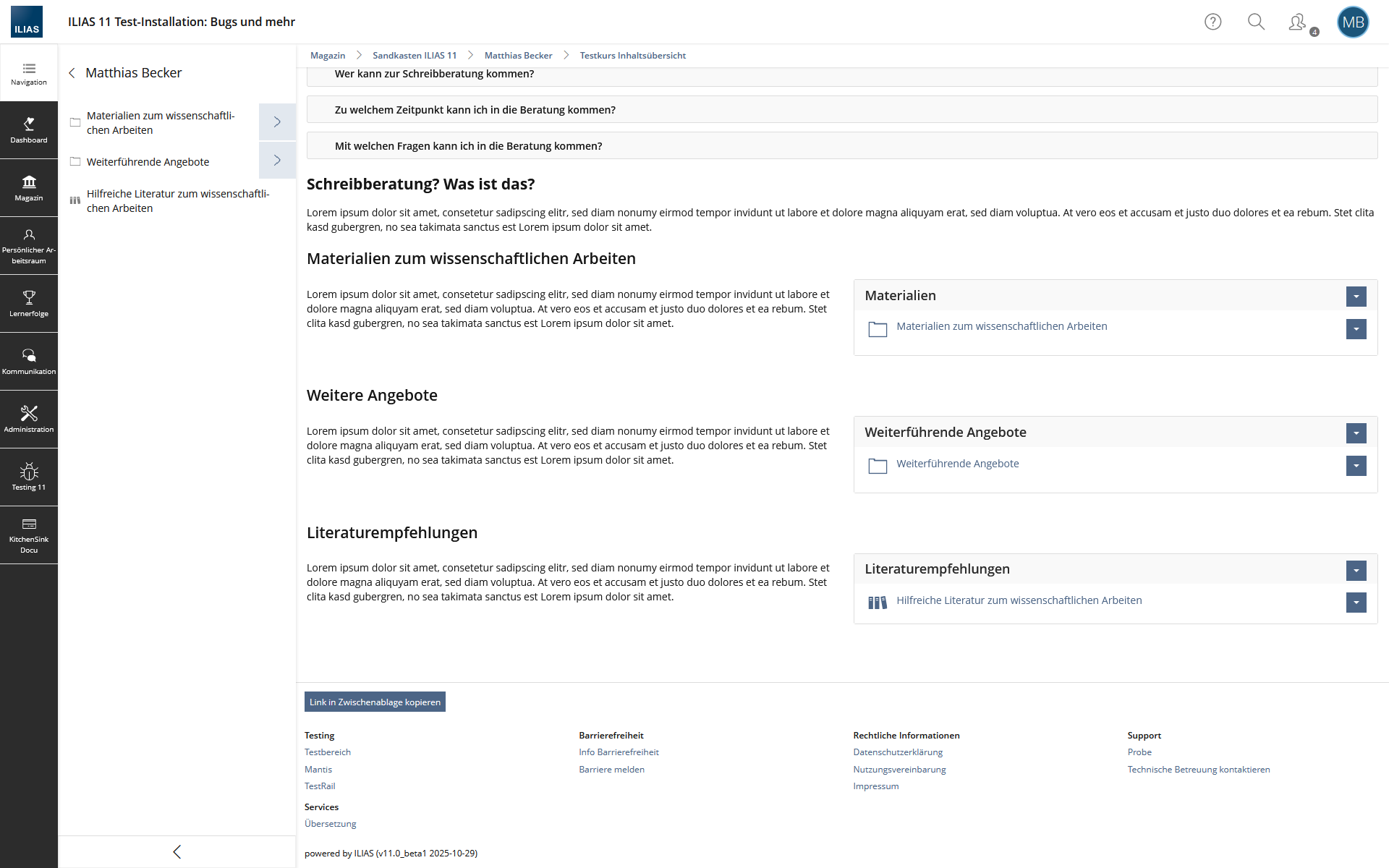
Drill-Down Navigation Mock-up

2.2.1 Navigation entry point
ILIAS should provide a prominent, consistently labelled navigation entry point.
A possible solution would be a Main Bar entry labelled "Content Navigation" or simply "Navigation". Activating this entry opens the global repository navigation in the Slate. The final label should be validated in usability testing and language experts. The label should describe the purpose from the user's perspective and should not use implementation-oriented and technical terminology such as "Tree View".
The entry should be:
- Present throughout repository navigation
- Available on all devices and screen sizes
- Clearly distinguished from personal functions, administration, search and generic tools
- Labelled with text rather than represented by an icon alone
- Identifiable as a navigation function
- Keyboard reachable
- Fully accessible to screen-reader users
2.2.2 Context-sensitive drill-down menu
When users open the global navigation, ILIAS should display the Slate containing a drill-down representation of the relevant repository hierarchy. The Slate should not expose the entire repository tree at once. Displaying all levels simultaneously would recreate the visual complexity and cognitive burden of the current tree view. Instead, the navigation should present one level of hierarchy at a time.
Each displayed entry should offer two separate interactions:
Interaction | Purpose |
|---|---|
Open current node | Navigates directly to the selected object or container |
Explore child level | Opens the next hierarchy level inside the Slate without leaving the current page |
The existing Slate Drill-Down component can serve as a technical and conceptual basis, but it requires extensions for repository navigation and persistent orientation. To implement the new drill-down navigation, the existing drill-down component (see KS documentation) would therefore need to be adapted. Buttons should allow users both to view the contents of the current repository node and to explore one level deeper within the same interface. The tree (multi) select input (see KS documentation) introduced with ILIAS 11 offers a suitable visual template for this. Instead of the (+), a > symbol should be used for the right button, and clicking > should take the user one level deeper in the drill-down within the slate (similar to how clicking "Layout and Navigation" currently works in the administration). The left button should then open the selected node level (similar to how clicking "Layout" opens the layout section after "Layout and Navigation").
2.2.3 Current location and active path
The global navigation must clearly show the user’s current location in the repository. The active node should be visible and programmatically determinable. In addition, all parent nodes forming the path to the current object should remain identifiable.
The navigation should therefore:
- Highlight the currently open object
- Mark the path from the repository root to the current object
- Provide a clear visual and non-visual distinction between:
- the active object
- parent objects in the active path
- sibling objects
- currently explored objects
- expandable objects
- leaf objects
- Announce the current location and hierarchy level to screen-reader users
- Preserve the path context while users explore adjacent levels
2.2.4 Direct links and deep links
The navigation must work reliably when users open repository objects through:
- Links in email messages
- Links in notifications
- Bookmarks
- Shared links
- Search results
- External websites
- Calendar or session links
- Links from other ILIAS objects
When a user enters a deeply nested object through a direct link, the drill-down should automatically initialise with a meaningful context.
At minimum, it should display:
- The current object
- Its direct parent
- The current object's siblings
The user must not be required to infer the surrounding structure from a breadcrumb that may be hard to notice, incomplete or misleading because of permission restrictions.
2.2.5 Relationship to breadcrumbs
Breadcrumbs should remain available as a compact secondary orientation aid. However, breadcrumbs must not be the only mechanism for navigating to parent levels or understanding the current repository context.
The global navigation should:
- Complement breadcrumbs.
- Provide the richer interactive representation of hierarchy.
- Offer a discoverable way to move upwards and explore neighbouring content.
- Reduce the consequences of breadcrumb visibility and permission-related limitations.
- Avoid duplicating breadcrumb functionality without adding additional orientation value.
Where technically possible, the navigation must respect the same permission logic as the breadcrumb path while preventing misleading representations. A user should not see inaccessible nodes as navigable objects.
2.2.6 Relationship to the Repository Tree
The current tree view should not be treated as the primary global navigation solution.
The proposed drill-down navigation differs from the tree view in several important ways:
Current tree view | Proposed global drill-down navigation |
|---|---|
Shows many levels or possible branches simultaneously | Shows one relevant level at a time |
Can become visually cluttered | Reduces irrelevant information and cognitive load |
Does not sufficiently communicate current location | Persistently indicates the active object and active path |
Is not intuitively perceived as navigation by many users | Is explicitly labelled and designed as global navigation |
Is difficult to use on small screens | Is designed for responsive Slate-based interaction |
Can expose large structural complexity at once | Supports progressive disclosure |
The existing tree view may remain available for specialised use cases if required. It should not be the only or primary solution for general end-user navigation.
2.2.7 Mobile Requirements
The mobile experience is a core requirement, not a later adaptation.
Because 63.64% of survey respondents use ILIAS via smartphone (75,42% of the students - the by far largest user group) and navigation is rated substantially worse on smartphones, the global navigation should be designed mobile-first.
The mobile implementation should:
- Use the Slate as a full-height or sufficiently large overlay where required
- Avoid displaying broad multi-column trees
- Use large, clearly separated target areas
- Provide a visible back control for movement to parent hierarchy levels
- Avoid excessive horizontal indentation
- Truncate long object titles carefully while preserving access to the full title
- Ensure that the current location remains understandable even when the path is long
- Work in portrait and landscape orientation
- Remain usable when software keyboards are displayed
- Avoid relying on tiny breadcrumb links as the sole way to navigate upwards
2.2.8 Summarized Functional Requirements
The global navigation must fulfil the following requirements.
- Provide a globally available, clearly labelled navigation entry point throughout the repository
- Make the entry point available in a prominent Main Control; do not provide it exclusively under "Tools"
- Open the navigation in a Slate-based interface
- Adapt the displayed hierarchy to the current repository context
- Work when users enter an object through ordinary navigation, a direct link, a bookmark, a search result, an email, a notification or an external link
- Display repository structures through progressive disclosure rather than rendering the complete repository tree at once
- Enable users to open a repository object directly
- Enable users to explore the child objects of a container without leaving the current page
- Clearly distinguish between opening a container and exploring its child objects
- Enable users to move upwards to parent levels within the Slate
- Enable users to return to previously explored hierarchy levels without losing orientation
- Provide a meaningful initial hierarchy view when a user opens a deeply nested object through a direct link
- Clearly identify the current repository object
- Clearly identify the path from the relevant repository context to the active object
- Make parent levels directly accessible where permissions allow this
- Distinguish active, parent-path, expanded, collapsed and ordinary navigation states
- Display only objects and metadata that the current user is permitted to access
- Prevent permission restrictions from creating misleading or broken navigation paths
- Load child levels on demand where necessary
- Avoid loading the full accessible repository hierarchy when the navigation is opened
- Provide visible and programmatically available loading and error states
- Retain the current drill-down state at least while the current session continues
- Return keyboard focus to the navigation trigger when the Slate is closed
2.2.9 Relationship to Course and Group Table of Contents
This Feature Request is closely related to, but distinct from, the proposed course and group table of contents.
Feature | Main purpose | Scope |
|---|---|---|
Global repository navigation | Orient and move through the repository, including parent levels and cross-container context | Entire accessible repository |
Course/group table of contents | Show the contents of the current course or group at a glance | One course or group container |
The global navigation answers:
Where am I in the repository, how do I move upwards, and what can I explore from here?
The course or group table of contents answers:
What content exists inside this specific course or group?
Both features should use compatible interaction principles and possibly shared UI components. They should not be merged into one feature because their context, scope and user expectations differ.
Additionally: In parallel, the breadcrumb component should be modernized. Even small CSS adjustments (see discussion) could align its visual representation with current industry standards and best practices, as documented in the analysis.
3 User Interface Modifications
3.1 List of Affected Views
- Main Menu Bar, Slate
3.2 User Interface Details
3.3 New User Interface Concepts
An adaptation of the slate drill-down would be required. A new input, preferably based on the visual model of the Tree (Multi) Select input, would need to be introduced. This input should support two functions: opening the selected node level and navigating one level deeper within the drill-down. In addition, the path leading to the current object should be highlighted persistently within the drill-down, both visually and in a screen-reader-accessible way, so that users can better understand their current position within the repository.
3.4 Accessibility Implications
The global navigation must be designed and implemented as an accessible hierarchical navigation component.
It must support:
- Full keyboard operation
- Visible keyboard focus
- Logical and predictable focus management when opening, closing and moving through the Slate
- Screen-reader announcements for:
- navigation entry point
- current hierarchy level
- current object
- expanded and collapsed state
- available child objects
- loading and error states
- Clear accessible names for separate controls, especially where one control opens an object and another explores its contents
- Semantic representation of hierarchical relationships.
- Sufficient touch target size
- Sufficient contrast for all state indicators
- Additional non-colour-based indication of active path and current location for screen readers
- Responsive operation at high zoom levels and narrow viewport widths
- Compatibility with screen magnification, browser zoom and reflow
- No interaction that depends solely on pointer precision, hover or drag-and-drop
4 Additional Information
4.1 Involved Authorities
- Authority to Sign off on Conceptual Changes: Fuhrer, Thibeau [tfuhrer]
- Authority to Sign off Code Changes: Fuhrer, Thibeau [tfuhrer]
If this request is related to multiple components, please list both authorities for all related components.
4.2 Technical Aspects
The implementation may build on the existing Slate Drill-Down component, but it requires functional extensions for repository navigation.
The component should support:
- Repository-aware data retrieval
- Permission-aware hierarchy generation
- Lazy loading of child nodes
- Active-path determination
- Direct-link context initialisation
- Clear differentiation between:
- opening an object
- expanding or exploring an object
- returning to a parent level
- indicating the current object
- Accessible state management
- Responsive behaviour
- Performance safeguards for large structures
The interaction model may visually draw on the Tree (Multi) Select input, but it should not simply reuse a form-input component for navigation. The resulting component needs to be a dedicated navigation pattern with suitable semantics, keyboard behaviour and accessibility support.
Potential technical questions requiring refinement include:
- How to determine and render the active path when parent objects are unavailable because of permissions
- Which repository levels should be initially expanded after opening a direct link
- How much of the hierarchy should be preloaded
- How to handle objects with very high numbers of children
- How to treat special object types, shortcuts, references and repository links
- How the new navigation interacts with breadcrumbs, current tree-view implementations and container-specific tables of contents
- Whether users should be able to pin or save frequently used repository locations in a later extension
4.3 Privacy
{ Personal data that will need to be stored or processed to implement this feature have to be listed here. For each date give a short explanation why it is necessary to use that date. }
4.4 Security
{ Does the feature include any special security relevant changes, e.g. the introducion of new endpoints or other new possible attack vectors. If yes, please explain these implications and include a commitment to deliver a written security concept as part of the feature development. This concept will need an additional approvement by the JourFixe. }
4.5 Contact
Person to be contacted in case of questions about the feature or for funding offers: Becker, Matthias [matthias.becker]
4.6 Funding
Funding status and funding parties are listed in the block 'Status of Feature' in the right column of this page.
If you are interested to give funding for this feature, please get into contact with the person mentioned above as 'Contact'.
5 Discussion
6 Implementation
Feature has been implemented by {Please add related profile link of this person}
6.1 Description and Screenshots
{ Description of the final implementation and screenshots if possible. }
6.2 Test Cases
Test cases completed at {date} by {user}
- {Test case number linked to Testrail} : {test case title}
6.3 Privacy
Information in privacy.md of component: updated at {date} by {user} | no change required
6.4 Approval
Approved at {date} by {user}.
Last edited: 15. Sep 2026, 18:39, Becker, Matthias [matthias.becker]