

































Feature Wiki
Tabs
Booking Pool: Support all-day schedules
Page Overview
[Hide]- 1 Initial Problem
- 2 Conceptual Summary
- 3 User Interface Modifications
- 4 Additional Information
- 4.1 Involved Authorities
- 4.2 Technical Aspects
- 4.3 Privacy
- 4.4 Security
- 4.5 Contact
- 4.6 Funding
- 5 Discussion
- 6 Implementation
- 6.1 Description and Screenshots
- 6.2 Test Cases
- 6.3 Privacy
- 6.4 Approval
1 Initial Problem
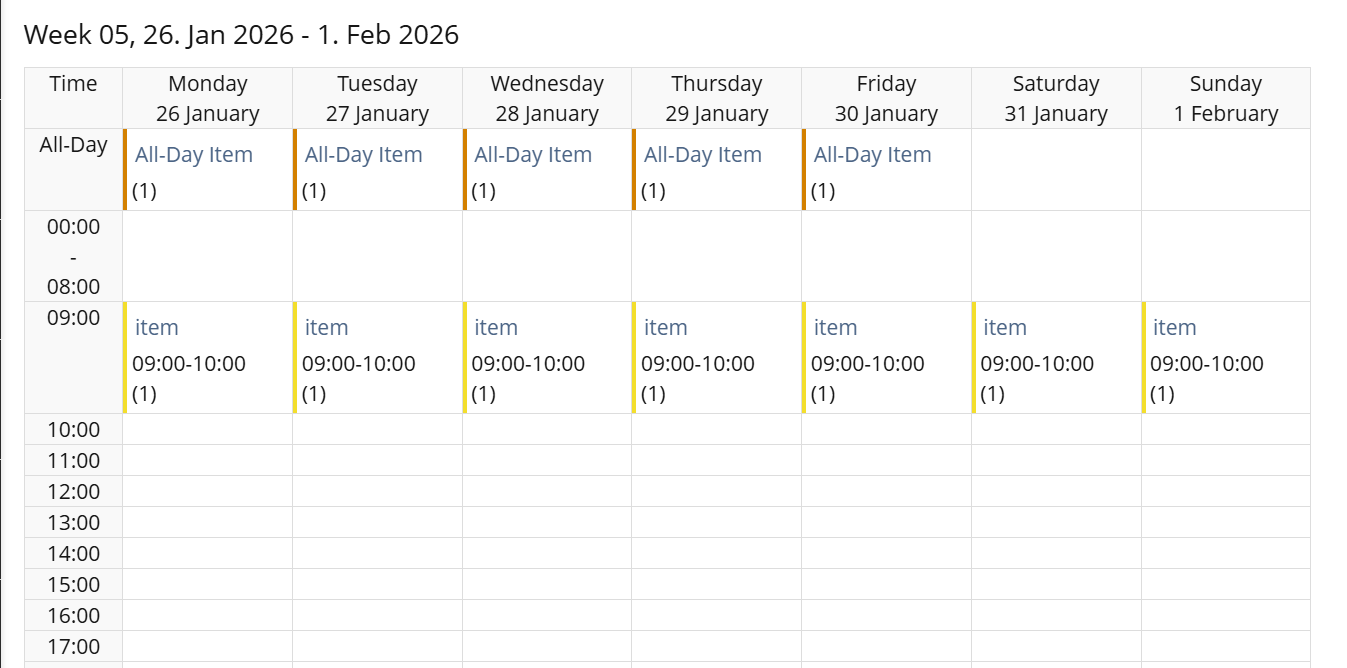
At the moment it is not possible to mark a schedule as "all-day" schedule. The user always has to enter the beginning and end of the time. If a schedule is created with the whole day as period, it is not shown for the whole day at the Week View.
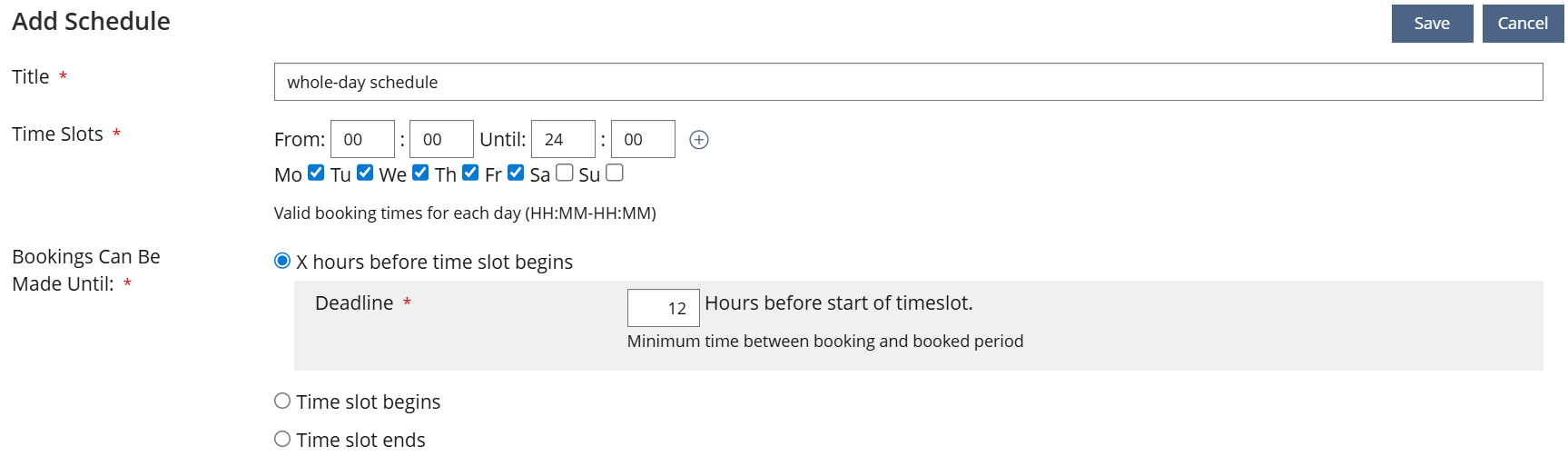
 creation of a schedule
 Week View with "all-day" time slots
2 Conceptual Summary
We would like to introduce the possibility to mark a schedule as all-day as alternative to enter the beginning and end time.
As consequence the time slot is shown:
- from 00:00 to 23:59 in text format
- at the top of a day at the Week View.
3 User Interface Modifications
3.1 List of Affected Views
- Booking Pool ›› Schedules ›› Add/Edit Schedule
- Booking Pool ›› Bookable Items ›› Week View
3.2 User Interface Details
3.2.1 Booking Pool ›› Schedules ›› Add/Edit Schedule
At the Add/Edit Schedule screen, the fields for Time Slots are reorganised. For the time itself, there are two radio buttons in order to decide on entering a time period or creating an all-day schedule.
The checkboxes for the days are separated because they are needed in any case.

3.2.2 Booking Pool ›› Bookable Items ›› Week View
At the Week View, a new row is introduced right underneath the table header in order to have a place for All-Day Schedules.
3.3 New User Interface Concepts
There are no new UI-concepts needed. We just are reorganising and extend existing UI.
3.4 Accessibility Implications
We will not introduce new UI, so we don't expect new accessibility implications.
4 Additional Information
4.1 Involved Authorities
- Authority to Sign off on Conceptual Changes: Samoila, Oliver [oliver.samoila], Lowe, Simon [simon.lowe]
- Authority to Sign off Code Changes: Joußen, Thomas [tjoussen]
4.2 Technical Aspects
{ Necessary technical information have to be provided here, e.g. dependencies on other ILIAS components, necessary modifications in general services/architecture, potential security or performance issues. }
4.3 Privacy
No personal data included in this feature.
4.4 Security
No security implications.
4.5 Contact
Person to be contacted in case of questions about the feature or for funding offers: Lowe, Simon [simon.lowe]
4.6 Funding
Funding status and funding parties are listed in the block 'Status of Feature' in the right column of this page.
If you are interested to give funding for this feature, please get into contact with the person mentioned above as 'Contact'.
5 Discussion
JourFixe, ILIAS [jourfixe], 26 JAN 2026: We highly appreciate this suggestion and accept the feature for trunk.
JourFixe, ILIAS [jourfixe], 27 APR 2026: We highly appreciate these suggestions and accept them for ILIAS 11, too. Please take care of testing these changes short before the stable and update the test cases accordingly. The feature originally scheduled for 12 will now already be available in 11.
JourFixe, ILIAS [jourfixe], 01 JUN 2026: We highly appreciated the suggested UI improvement in Chap. 6.1 and accept it for trunk.
6 Implementation
Feature has been implemented by {Please add related profile link of this person}
6.1 Description and Screenshots
At the implementation of the feature we had to slightly differ from the mockup above.
Normal Time Slot configuration

All-Day configutation

6.2 Test Cases
Test cases created/adjusted at 20 JUL 2026 byLowe, Simon [simon.lowe]
- C93506 : Add All-Day schedule
6.3 Privacy
no change required
6.4 Approval
Approved at {date} by {user}.
Last edited: 20. Jul 2026, 13:05, Lowe, Simon [simon.lowe]